Goblin
Goblin is a private, mobile-first payments app for Grin. Think Cash App, but the money is Grin, your address is a Nostr key (an npub), and the whole conversation can ride Tor.
You type alice instead of pasting a 90-character key: a username is an optional, friendly alias that the wallet resolves to the real address (the npub) behind the scenes. You tap Pay/Request, hold to confirm, and a Grin payment travels end-to-end encrypted over the Nostr network, so no relay, no network observer, and no chain analyst can tie the sender to the receiver. Turn on Tor routing (on by default for wallets that update; a per-wallet choice for new ones) and your IP is hidden from the relay too.
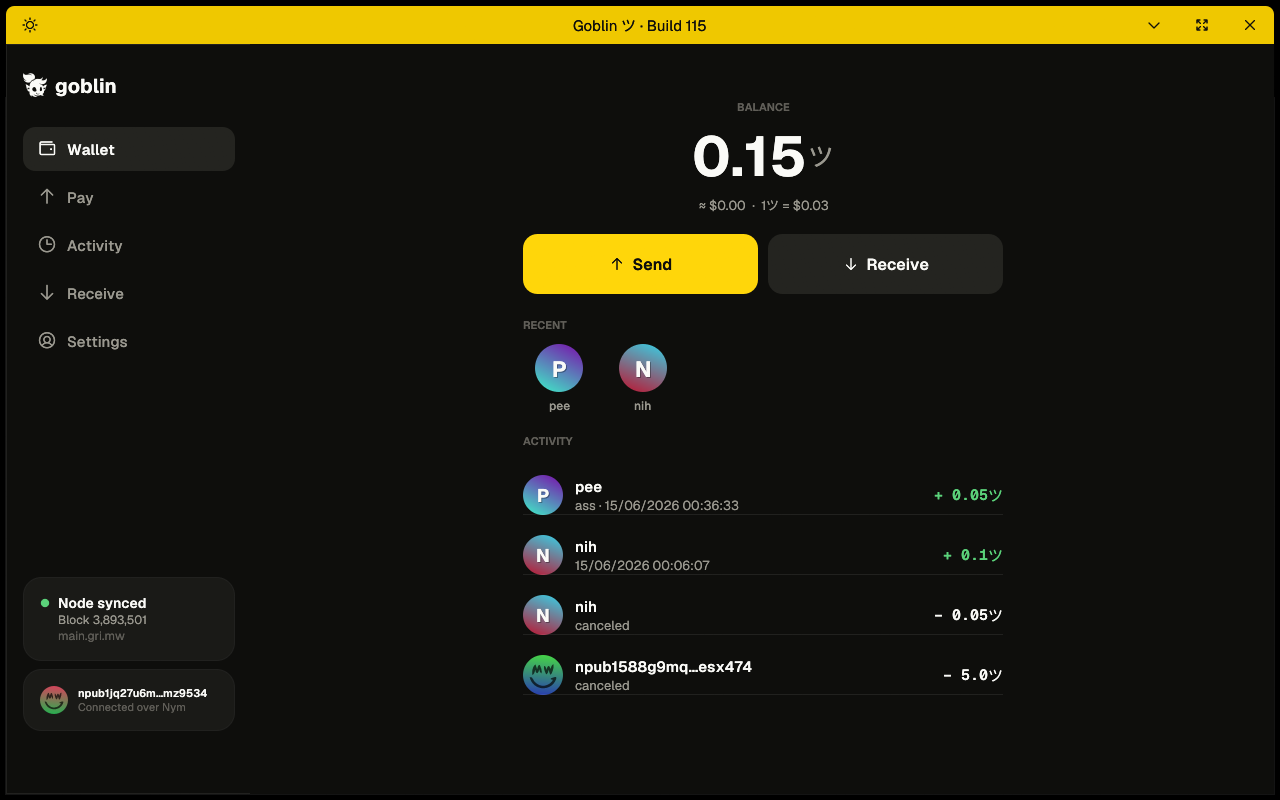
Goblin home, connected over Tor (optional).
Under the hood Goblin stands on three pillars:
| Pillar | What it gives Goblin |
|---|---|
| GRIM | A complete, audited Grin wallet + node engine: seed, sync, and the Mimblewimble slatepack transaction machinery. Goblin forks it and keeps it. |
| Nostr | The messaging layer. Addresses (npub keys) with optional usernames on top, encrypted payment messages (gift-wrapped slatepacks), and offline delivery, all without running our own bespoke server. |
| Tor | The transport, as a per-wallet switch. With Tor routing on, all relay traffic and every HTTP request rides Tor, embedded in-process, out through a Tor exit to each destination’s ordinary clearnet host. The public Grin chain connection is always direct, by design. |
Goblin is also one piece of a larger Grin-native stack: the GoblinPay till, the Magick Market marketplace, and Floonet relays all speak the same wallet-to-wallet payment rail. For a tour of how they fit together, and how to self-host them, see goblin.st/use-cases.
How to read these docs
The docs are organized from the outside in:
- Overview: what Goblin is and how the pieces fit.
- Pillars: the three foundations (GRIM, Nostr, Tor), each broken into its component parts.
- Features: the things you actually do: pay, request, claim a name, onboard.
- Subsystems: the smaller machinery: themes, avatars, QR, localization, security.
- Operating Goblin: run your own name authority and relay; build from source.
Every component page follows the same shape:
Summary: one paragraph, what it is. Motivation: why it exists, the problem it solves. How it works: a plain-language walkthrough, with screenshots. Reference: the technical detail: types, functions, wire formats. References: links into the source (
file:line) and the external standards.
Goblin is open source. Where these docs cite code, they point at the public source tree so you can read along.
Quick start
New to Goblin? This is everything you need to send and receive money. It takes about two minutes.
Goblin is like Cash App, but for Grin. You pay a username (an easy alias for your friend’s real address, their npub), your money stays private, and there’s nothing to set up beyond a wallet.
1. Set up your wallet
The first time you open Goblin:
- Tap Get started. Goblin connects you to the Grin network automatically, so there’s nothing to set up.
- Pick a wallet name and a password.
- Goblin shows your recovery phrase: a list of words. Write them down on paper and keep them somewhere safe. These words are your money. If you lose them, nobody can get your funds back for you.
- Re-enter the words to confirm you saved them.
- Your wallet already has an address, a long key called an npub. Optionally pick a username like
yourname, a friendly alias that points to your npub, so friends can pay you without copying the key. Or tap Skip to stay anonymous.
That’s it. You’re ready.
2. Get paid (receive)
You receive money by sharing your username or your code.
Share your handle
- Tap Receive.
- Show your QR code, or tap Share or Copy to hand over your payment code (an
nprofile, your address plus a hint of where to reach you). Your username works too, if you claimed one. - Send that to whoever is paying you.
When they pay, it lands in your wallet on its own, even if your app was closed.
Ask for a specific amount
- Open Pay/Request (the ツ button) and enter the amount you want.
- Tap Request.
- Pick a contact or share the request. They get a tap-to-pay request.
3. Pay someone (send)
- Tap the big ツ button in the middle to open Pay/Request.
- Type their username or npub, or tap the scan icon to scan their QR code.
- Enter the amount.
- Optional: add a short note.
- Check the details, then press and hold the send button until it fills.
Done. Your payment goes out encrypted and private. The other person’s wallet finishes it automatically, even if they were offline when you paid.
4. Check a payment
Tap Activity to see everything you’ve sent and received, and whether each one has confirmed yet.
Good to know
- Your recovery phrase is your money. Back it up on paper. Goblin can’t reset it for you, and support can’t either.
- Payments are private by default. They travel encrypted, and the network hides who paid whom. Here’s how.
- Private by choice. Goblin can route its payment network over Tor, running right inside the app, so the relay never sees your IP. It’s a per-wallet switch under Settings → Privacy → Tor routing: a wallet you updated from an older version keeps Tor on, and a brand-new wallet asks you during setup (off means faster to connect but the relay can see your IP, so pair it with a VPN if that matters to you). With Tor on the money path still connects in a couple of seconds; the very first connection can take a moment while Tor warms up, which is normal.
- Paying someone who isn’t on Goblin? Use Settings → Wallet → Slatepacks for the by-hand method.
- On Android, the back button won’t dump you out of the app by accident. On the wallet home screen, press back twice to return to the wallet switcher; the first press shows a “Press back again to switch wallets” hint. The confirmation to exit the app lives at the wallet switcher.
Want the full picture of how it all works? Start with What is Goblin?
What is Goblin?
Summary. Goblin is a mobile-first wallet for Grin that lets you pay a username or npub instead of swapping transaction files. (The npub, a Nostr key, is the actual address; a username is an optional alias that resolves to one.) It is a fork of the GRIM Grin wallet, with a Nostr-based messaging layer and an embedded Tor transport bolted on so payments are end-to-end encrypted and metadata-private from the network up.
The problem Goblin solves
Grin is built on Mimblewimble: there are no addresses and no amounts on the chain, which makes it one of the most private cryptocurrencies in existence. But that privacy comes with a famously awkward UX. Grin transactions are interactive: to build one, the sender and receiver each have to contribute to a “slate,” passing a slatepack file back and forth at least once before the payment is final.
In practice that means emailing files, pasting blobs into chat, or both parties being online at the same time. It works, but nobody would call it Cash App.
Goblin’s thesis is simple: keep Grin’s on-chain privacy, and make the off-chain handshake feel like sending a text.
How it feels
You open Goblin to a single balance and a Pay/Request button. You type alice (or paste an npub), enter an amount, add an optional note, and hold to send. Alice’s wallet (even if it was closed when you paid) picks the payment up the next time it connects, finishes its half of the transaction automatically, and the money settles on the Grin chain. Neither of you ever saw a slatepack.
What makes that possible
Three things, each documented in depth in these pages:
-
A real Grin wallet underneath. Goblin doesn’t reimplement Grin; it forks GRIM and keeps its full node + wallet engine: seed and key management, chain sync, and the slatepack transaction state machine. Everything Goblin adds sits on top of an unmodified, audited wallet core.
-
Nostr as the courier. The slatepack is wrapped as an encrypted Nostr message and delivered through public relays. Relays buffer messages for wallets that are offline, so the exchange is asynchronous. Relays only ever see ciphertext, never the amount, the sender, or the recipient. Your address is your Nostr key (your npub); a username like
aliceis an optional NIP-05 alias that resolves to it. -
Tor for network privacy. With Tor routing on, every connection Goblin makes (relay sockets and every HTTP request for name lookups, price, avatars) is tunneled through Tor, embedded right inside the app, out through a Tor exit to each destination’s ordinary clearnet host. The relay, and anyone watching the network, sees a Tor exit address, never your phone’s IP. That’s Tor’s one narrow job; the relay and the Nostr protocol hide the rest (the message content, the sender, and the send/receive timing) whether Tor is on or off. Tor routing is a per-wallet setting: a wallet you update keeps it on, a new wallet chooses during onboarding, and with it off the same encrypted traffic goes direct so the relay can see your IP. The Grin node connection carries only public chain data and is always kept direct.
What stays the same as Grin
Goblin is still a self-custodial Grin wallet. Your funds are controlled by your seed phrase; your transactions are confidential Mimblewimble transactions; you can run your own node or use an external one. If you ever need to pay someone who isn’t on Goblin, the classic by-hand slatepack flow is still there under Settings → Wallet → Slatepacks.
Where to go next
- Architecture: the three pillars: how the pieces connect.
- The end-to-end payment flow: follow one payment from tap to chain.
- Nostr in Goblin and Tor in Goblin: the layers that make it private.
References
- Project README and banner:
goblin/README.md. - Crate metadata (package
grim, binarygoblin, fork base):goblin/Cargo.toml,goblin/build.rs. - Grin / Mimblewimble: https://grin.mw, https://github.com/mimblewimble/grin.
Architecture: the three pillars
Summary. Goblin is layered. A GRIM wallet/node core handles money; a Nostr layer handles messaging and identity; a Tor layer handles transport. The UI ties them into a Cash-App-style experience. Each layer is replaceable in principle and isolated in the code.
The stack, top to bottom
┌─────────────────────────────────────────────────────────┐
│  Goblin UI   (src/gui/views/goblin/)                     │
│  Home · Pay/Request · Activity · Receive · Me · Send flow│
├─────────────────────────────────────────────────────────┤
│  Nostr messaging   (src/nostr/)                          │
│  identity · gift-wrapped slatepacks · ingest policy ·    │
│  relays · NIP-05 names · per-wallet service thread       │
├─────────────────────────────────────────────────────────┤
│  Tor transport   (src/tor/)                              │
│  embedded arti -> a Tor exit -> each relay's clearnet host│
│  ALL relay sockets + HTTP go through here                │
├─────────────────────────────────────────────────────────┤
│  GRIM wallet + node engine   (wallet/, node/)            │
│  seed · keys · sync · Mimblewimble slatepack tx machine  │
└─────────────────────────────────────────────────────────┘
        │                                   │
        Tor                          Grin node (direct,
 (identity + payments               public chain data,
  + price + avatars)                 not tied to identity)
Why these three
Each pillar exists because the layer below it leaves a gap:
- GRIM gives a correct, complete Grin wallet, but its native payment UX is file-swapping. Gap: usability.
- Nostr closes that gap: it turns the slatepack handshake into encrypted, store-and-forward messaging addressed by key, with human usernames on top. It also hides the content, the sender (a throwaway one-time key), and, via our own relay’s randomized release delay, the timing. Gap it leaves: the relay still sees your IP.
- Tor closes that one gap: the relay is the machine you connect to, so it’s the only piece that can’t hide your network location by itself. A Tor-exit circuit shows the relay a Tor address, never your phone. Result: who-pays-whom is private from the chain up and the network down.
That division of labor is the whole design: Tor hides your network location from the relay; the relay and the Nostr protocol hide everything else. It’s why Goblin needs Tor for just one narrow job; see Tor in Goblin.
What rides which transport
A deliberate split (see the transport page). The Tor rows below apply when Tor routing is on (the default for updated wallets, and a per-wallet choice for new ones); with it off those same rows go direct, still end-to-end encrypted but exposing your IP to the relay. The Grin node row is always direct.
| Traffic | Path | Why |
|---|---|---|
| Nostr relay sockets (payments, identity events) | Tor (a Tor-exit circuit to the relay’s clearnet host) | Reveals your network location to the relay; must be hidden. |
| NIP-05 name lookups (HTTP) | Tor (a Tor-exit circuit to the name authority’s clearnet host) | Reveals who you’re about to pay. |
| Price feed, avatars (HTTP) | Tor (out through an exit relay to the clearnet host) | Reveal your IP and tie you to the app. |
| DNS | None on the device (every hostname resolves at the Tor exit) | A clearnet lookup would announce which relays and hosts you contact. |
| Grin node connection (block sync, broadcast) | Direct | Public chain data, identical for everyone, not tied to your identity. Anonymizing it buys little and costs reliability. |
Code map
| Layer | Directory | Start here |
|---|---|---|
| UI | goblin/src/gui/views/goblin/ | mod.rs (GoblinWalletView) |
| Nostr | goblin/src/nostr/ | mod.rs, client.rs |
| Tor | goblin/src/tor/ | the arti engine, copied from GRIM |
| Wallet↔Nostr glue | goblin/src/wallet/wallet.rs | WalletTask::Nostr* |
| GRIM core | goblin/wallet/, goblin/node/ | inherited from GRIM |
| Identity server | goblin-nip05d/ (sibling crate) | the NIP-05 authority |
A payment in one breath
You tap Pay → GRIM builds a slatepack → the Nostr layer gift-wraps it and publishes it to relays → the bytes leave your machine over a Tor exit, to the relay’s clearnet host → the recipient’s wallet ingests it, auto-builds its half, and replies the same way → your wallet finalizes and GRIM broadcasts to the Grin node. The payment-flow page walks every step.
References
- Layer directories:
goblin/src/{gui/views/goblin,nostr,tor}/,goblin/wallet/,goblin/node/. - Transport split rationale:
goblin/README.md; see also Tor in Goblin.
GRIM: the wallet engine Goblin forks
Summary. Goblin is a fork of GRIM, a cross-platform Grin wallet and integrated node written in Rust on egui. Goblin keeps GRIM’s entire money engine (seed/key management, node and chain sync, and the Mimblewimble slatepack transaction state machine) unmodified, and adds its payments experience in new modules alongside it.
Motivation
Writing a correct cryptocurrency wallet is hard and security-critical; writing a Grin wallet and a full Grin node is harder still. GRIM had already done that work: a mature, audited egui app with the complete Grin stack vendored in. Rather than reimplement any of it, Goblin forks GRIM and treats it as a stable foundation, so all of Goblin’s new code is about messaging and transport, not about money primitives. This keeps the risky surface (key handling, transaction building, consensus) on well-trodden upstream code.
How it works
GRIM bundles the Grin node and wallet libraries as path dependencies and drives them from an egui UI. Goblin inherits all of that:
- Seed & keys. BIP-39 mnemonic (12–24 words), the wallet master seed, and Grin’s output/rangeproof key derivation: all GRIM/Grin code. Your Grin funds are controlled by this seed. (Goblin’s nostr identity is deliberately separate; see Identity.)
- Integrated node + sync. GRIM can run a full Grin node or talk to an external one, track the chain tip, and scan for your outputs. Goblin exposes this under Settings → Advanced but does not change it.
- The slatepack transaction machine. Grin’s interactive flow (Standard (send) and Invoice (request), each a two-step slate exchange) and the slatepack armor encoding live in the Grin wallet library. Goblin’s entire job is to carry these slatepacks; it never alters how they’re built or validated.
- The egui shell & platform layer. Window, fonts, Android/desktop entry points, camera, and storage abstractions come from GRIM.
What Goblin adds lives in two new trees that GRIM doesn’t have (src/nostr/ and src/gui/views/goblin/), plus a src/tor/ transport copied from GRIM’s own proven Tor engine and pointed at the relay, and a handful of hooks into the wallet lifecycle (src/wallet/wallet.rs) to start/stop the Nostr service and dispatch WalletTask::Nostr* jobs.
What Goblin changes in upstream is intentionally minimal: it swaps the default presented surface to the Goblin UI, routes all of its Nostr and HTTP traffic through that embedded Tor transport, and rebrands. The original GRIM tree is kept side-by-side (at ../grim) precisely so the fork can be diffed and stay close to upstream.
Reference
- Crate identity. The package is still named
grim(version = "0.3.6"), the binary isgoblin; seegoblin/Cargo.toml([package],[[bin]]). The node/wallet libraries are path deps:grin_api = { path = "node/api" },grin_chain,grin_wallet_*, etc. - Versioning is build-number based, off the fork point.
goblin/build.rsdefinesGOBLIN_FORK_BASE = "b51a46b"(the GRIM commit Goblin forked from) and computes Build N = number of commits since the fork viagit rev-list. An explicitGOBLIN_BUILDenv var overrides it (used by CI single-commit public builds). So Goblin ships “Build 97,” not a semver. - Release profiles.
[profile.release]strips symbols (the tor+nostr+grin tree is ~16 MB of symbols);[profile.release-apk]addsopt-level="z",lto,panic="abort"for Android size. - Upstream. GRIM lives at https://code.gri.mw/GUI/grim (author Ardocrat). Goblin’s
repositoryfield still points there.
To see exactly what the fork changed, diff the two trees:
diff -ru ../grim/src ./src        # new: nostr/, gui/views/goblin/; tor/ from GRIM
diff -ru ../grim/Cargo.toml ./Cargo.toml
References
goblin/Cargo.toml: package name, binary, path deps, release profiles.goblin/build.rs:5-6:GOBLIN_FORK_BASE = "b51a46b"; build-count logic at:11-34.goblin/README.md: “Goblin is a fork of the Grim egui GRIN wallet…”.- Reference copy of upstream GRIM:
../grim(sibling of thegoblintree). - egui: https://github.com/emilk/egui.
Nostr in Goblin
Summary. Goblin uses Nostr as its messaging and identity layer. A Grin slatepack is wrapped as an encrypted Nostr direct message and delivered through public relays; your identity is a Nostr keypair with an optional human-readable NIP-05 username. Relays buffer messages, so payments are asynchronous; relays see only ciphertext.
Why Nostr
The hard part of a Grin payment is getting the two slatepack legs between sender and receiver. That is a messaging problem: a small encrypted blob needs to reach a specific recipient, who might be offline, identified by something friendlier than a 90-character address.
Nostr is a good fit because it already solves the boring parts:
- Addressing by key. Every user is a public key; you message a key.
- Store-and-forward. Relays hold events for offline clients and deliver them on reconnect: exactly the asynchronous mailbox an interactive payment needs.
- A real encryption story. NIP-17 / NIP-44 / NIP-59 give sealed, gift-wrapped DMs where relays can’t read the content or see the real sender.
- Human names without a blockchain. NIP-05 maps
alice@goblin.stto a key over plain HTTPS. - An existing, decentralized network. No bespoke server to run; any relay works, and you can run your own.
Goblin could have built a custom relay (the way grinbox did for Grin years ago). Using Nostr instead means inheriting a maintained ecosystem and standard, audited encryption, and adding Tor underneath to hide the one thing Nostr alone can’t: your network location from the relay.
The parts
The Nostr layer (goblin/src/nostr/) breaks into six components, each with its own page:
| Page | What it covers | Key file |
|---|---|---|
| Identity | The nostr keypair, encryption at rest, rotation | identity.rs |
| Payment protocol | How a slatepack becomes a gift-wrapped event | protocol.rs |
| The NostrService | The per-wallet relay thread + send pipeline | client.rs |
| Ingest policy | What the wallet accepts, and what it never does | ingest.rs |
| Storage, config & types | The metadata archive and per-wallet settings | store.rs, config.rs, types.rs |
| Relays | Defaults, the candidate pool, DM relay lists, the editor | relays.rs, pool.rs |
The NIPs Goblin implements
NIP-05 (names), NIP-06 (key derivation), NIP-11 (relay information, as the pool gate), NIP-17 (private DMs), NIP-19 (npub/nprofile encoding), NIP-44 (encryption, v3 with v2 fallback), NIP-49 (encrypted key at rest), NIP-59 (gift wrap), NIP-65 (relay lists), NIP-98 (HTTP auth). Each is cited on the page where it’s used.
References
goblin/src/nostr/: the whole layer (mod.rsre-exports the public surface).- Nostr protocol & NIPs: https://github.com/nostr-protocol/nips, https://nostrbook.dev.
Identity (NIP-06 / NIP-49)
Summary. Each wallet has a Nostr keypair that is its payment identity. The secret key is stored encrypted at rest (NIP-49
ncryptsec, owner-only file permissions). Crucially, this key is separate from your Grin seed, so you can rotate your identity to stay unlinkable without ever touching your funds. A wallet can also hold several identities at once, all listening together; see Multiple identities.
Motivation
Two design tensions shape Goblin’s identity:
- Linkability. If your payment identity were derived from your wallet seed, it would be permanent: every payment forever tied to one key. Goblin wants you to be able to start fresh. So the nostr key is independent and rotatable.
- Safety at rest. The secret key sits on a phone. It must never be on disk in the clear, and the file must not be world-readable.
How it works
Your identity lives in wallet_data/nostr/identity.json, written with Unix mode 0600 inside a 0700 directory. Inside, the secret key is a NIP-49 ncryptsec: a bech32 blob encrypted with your wallet password via scrypt (work factor log_N = 16, ~64 MiB, interactive grade). The file also stores your npub in the clear (so the UI can show “you” before you’ve unlocked), your nip05 name if you’ve claimed one, an anonymous flag, and prev_npubs, a history of keys you’ve rotated away from.
Identity files are never cut or overwritten. Identity files and the identity index (identities.json) are written atomically: the new content goes to a temporary file beside the target, is flushed to disk, and then replaces the old file in one rename, so a crash, a killed app or a full disk mid-write leaves either the old file or the new one, never a cut one. When the wallet opens:
- A file that is there but damaged (not JSON, cut short, empty) is renamed aside as
<name>.unreadable-<unix time>in the same folder, its bytes unchanged, with an error in the log, and the wallet opens and carries on. A damagedidentity.json(identity #1) is replaced by a new random identity #1 and the wallet runs on it; any other identities you hold stay held, and stay active if one was. A backup of the old identity #1 can then be brought back with Import. A damaged index is rebuilt from identity #1 alone and the wallet opens on #1; the other identities’ key files are left untouched on disk, but are no longer listed until you import them again. - A file that is valid JSON of a shape this build doesn’t know (written by a newer build, before you went back to this one) is left in place: the wallet opens, and Nostr stays off for that session.
- A file that can’t be read at all (permissions, an I/O error) is also left in place, and Nostr stays off for that session.
Where a platform refuses part of the atomic write (a filesystem that doesn’t support flushing, or on Windows a file another program holds open for a moment), the save still completes, as it did in older builds.
Changing the wallet password. The Grin seed and every identity the wallet holds are encrypted with the same wallet password, and a password change moves them together or not at all. Before the seed moves, the wallet checks that every identity unlocks with the old password; if one doesn’t, nothing changes. If the identities still fail to move after the seed did, the seed is moved back. A wallet that an earlier failed change (Build 168 or older) left split, seed on one password and identities on the other, repairs itself: change the password from the seed’s password to the one the identities are on, and only the seed moves.
There are three ways an identity comes to exist (IdentitySource):
- Random (default): a brand-new independent key (
Keys::generate). Unlinkable to your seed and to any other wallet. - Imported: you paste an
nsecor restore an encrypted backup file, adopting an existing identity (name and history included). - Derived: a NIP-06 seed-derived key. Kept for legacy wallets; new wallets use Random.
Starting a fresh, unlinkable key does not need a dedicated rotate action, and the old one was removed: it was only a random add-and-switch that also released your name, adding nothing over the identity switcher. To present as a new independent key you add an identity (a random Keys::generate key, unlinkable to your seed and your other identities) and switch to it, all without re-seeding, so your Grin balance is untouched. Adding a new key does not carry your username or profile to it; to keep a name on a new key, transfer the name through the authority. See Multiple identities. The prev_npubs field still records keys a wallet has moved away from.
Backup & restore. As of Build 158 the backup (Settings → Advanced, under Advanced nostr settings, captioned “Contains your wallet and all identities.”) writes one sealed, encrypted .backup file that holds both your Grin money seed and every identity the wallet holds, with the active one marked. One file now moves a whole wallet, funds and names together, so there is no longer a separate seed-phrase-plus-identity-file dance. Restoring it is a single step in onboarding: the restore flow’s “Choose a .backup file” picker takes the file, you unlock it with the wallet password, and it fills the 24-word recovery grid for you; once the wallet opens, the identities restore automatically (a “Restoring your identities…” card shows the progress). Older single-identity backups still restore: importing one adopts that one identity (name and history included), decrypting with its export-time password and re-encrypting under the new wallet’s password. “Backup saved” appears only once the file has really been written to the place you picked; closing the save dialog returns you to the backup form, and a write that fails shows “Couldn’t save the file.”, so you are never told a backup exists when it doesn’t.
Logging in to other nostr apps. Settings → Advanced → Nostr key reveals your nsec behind your wallet password: enter the password, then copy the key or show it as a QR. Scanning that QR (or pasting the copied nsec) into another nostr app’s private-key login, for example magick.market, signs you in with the same identity your wallet uses. The key is derived on demand behind the password and never persisted in the clear; a wrong password reveals nothing. The same page can reveal your recovery phrase behind the password. A revealed key or phrase is hidden again as soon as you leave the page. A copied nsec (or a recovery phrase copied while setting up a wallet) is cleared from the clipboard after 45 seconds if the clipboard still holds it. On Android the copy is also marked sensitive, and if Goblin isn’t in front when the 45 seconds pass, it is cleared when you come back to the app; while the page shows the phrase, the nsec or its QR, the screen is hidden from screenshots, screen recording and the Recents view.
Reference
IdentitySourceenum and theNostrIdentitystruct:goblin/src/nostr/identity.rs. Fields:ncryptsec,npub,nip05,anonymous,prev_npubs.- Encryption at rest: NIP-49
ncryptsec, scryptNCRYPTSEC_LOG_N = 16. - File safety:
write_private()(Unix0600),restrict_dir()(0700); stored atwallet_data/nostr/identity.json(goblin/src/nostr/identity.rs:257,:353). - The atomic writer is in
identity.rsand shared byNostrIdentity::save()/save_at()(:426,:452),HeldIdentities::save()(goblin/src/nostr/identities.rs:153) andreencrypt_all().stage_private()(:105) writes an owner-only temp file beside the target and flushes it;commit_staged()(:179) renames it over the target and then flushes the directory (sync_parent_dir(),:237; a refusal there is only logged). A filesystem without fsync support is tolerated, while any other flush error still fails the save (fsync_unsupported()/sync_file(),:135,:160). On Windows a busy rename is retried and then written in place (replace_on_windows(),:200). - Reading on open:
read_or_set_aside()(identity.rs:309-350) withset_aside()(:267, the<name>.unreadable-<unix time>name, never replacing an earlier aside file). A file of a format this build does not know is told apart bylooks_like_identity()(:418, a stringnpub) andlooks_like_index()(identities.rs:139).init_nostr()(goblin/src/wallet/wallet.rs:486-559) makes a new identity #1 after a set-aside (:510-524) and turns Nostr off for an unreadable file (:528-534).HeldIdentities::load_or_migrate()(identities.rs:221-291) rebuilds a set-aside index from identity #1 and does not save over a file it left in place. When the index on disk cannot be used,unlock_all_identities()(wallet.rs:566-606) finds nothing and Nostr stays off (:543-548). - Key derivation for the legacy
Derivedsource:derive_keys()(NIP-06 BIP-44 path). - Import/backup UI: identity import lives in the add sheet of the identity switcher (
IdentitySwitchState,goblin/src/gui/views/goblin/mod.rs:582); the backup card isBackupState(mod.rs:639) drawn bybackup_ui()(goblin/src/gui/views/goblin/settings.rs:236); onboarding import inonboarding.rs(OnbImport). The backup card reacts to the real save outcome (SaveResult: saved, cancelled, failed) inapply_save_result(),goblin/src/gui/views/goblin/settings.rs:364;SaveResultis ingoblin/src/gui/platform/mod.rs:112. - Password change:
Wallet::change_password()(goblin/src/wallet/wallet.rs:2456), with the dry-run checkHeldIdentities::verify_all_unlock()and the all-or-nothingreencrypt_all()(goblin/src/nostr/identities.rs:443,:467); the seed file is made owner-only (0600) again after every change, repair or rollback (change_seed_password(),wallet.rs:2515). - Secrets on screen: the Advanced page state is dropped whenever the page is not drawn (
advanced_state_kept(),goblin/src/gui/views/goblin/mod.rs:309); the secure-screen flag followssecret_shown()(mod.rs:299, set atmod.rs:850), the onboarding words and confirm steps (onboarding.rs:217) and the wallet-creation word grids (goblin/src/gui/views/wallets/content.rs:410); Android applies it asFLAG_SECURE(MainActivity.setSecureScreen,MainActivity.java:826). - Copying a secret:
copy_secret_to_buffer()(callers: thenseccopy,goblin/src/gui/views/goblin/settings_advanced.rs:267; the onboarding phrase copy,onboarding.rs:676; the wallet-creation phrase copy,goblin/src/gui/views/wallets/creation/content.rs:237); AndroidMainActivity.copySecretText()andclearSecretClipIfDue()(MainActivity.java:552,:580; 45 s TTL at:87); desktop clears afterCLIPBOARD_SECRET_TTL_SECS = 45(goblin/src/gui/platform/desktop/mod.rs:30).
References
- NIP-06 (key derivation from mnemonic): https://nips.nostr.com/6.
- NIP-19 (
npub/nsec/nprofilebech32): https://nips.nostr.com/19. - NIP-49 (encrypted secret key): https://nips.nostr.com/49.
- Identity is deliberately not the Grin seed; see GRIM base and project rationale in the wallet README.
The payment protocol (NIP-17 / 44 / 59)
Summary. A Grin slatepack is delivered as a NIP-17 private direct message: a
kind 14rumor carrying the slatepack armor, sealed and gift-wrapped (NIP-59) inside akind 1059event encrypted with NIP-44 (v3 when both wallets support it, v2 otherwise). Relays see only the wrap: not the content, not the real sender, not the timestamp.
Motivation
The courier needs three properties Grin’s bare slatepack doesn’t have on its own:
- Confidentiality: a relay must not read the slatepack (it would reveal a pending payment and its amount).
- Sender privacy: a relay must not even learn who sent the message.
- A stable, versioned wire format: so two Goblin wallets (and other NIP-17 clients) agree on how to read it.
NIP-17/44/59 give the first two for free; Goblin adds a thin, explicit protocol on top for the third.
How it works
A payment message is built in layers:
kind 14 rumor   ── content: PREAMBLE + "\n\n" + <slatepack armor>
   (unsigned)      tags: ["goblin","1"]  + optional ["subject", note]
      │
   NIP-59 seal (kind 13)  ── signed by the REAL sender, NIP-44 encrypted
      │
   NIP-59 gift wrap (kind 1059) ── signed by a throwaway EPHEMERAL key,
                                    NIP-44 encrypted to the recipient,
                                    timestamp randomized into the past
      │
   published to relays
- The content starts with a human-readable preamble (
"[Goblin] GRIN payment message: open in Goblin (https://goblin.st) to process."), then a blank line, then the rawBEGINSLATEPACK…ENDSLATEPACKarmor. Other NIP-17 clients render something legible; Goblin extracts the slate. - A
["goblin","1"]tag marks the protocol and its version. Classification never trusts tags: the wallet decides what a message is only by parsing the slate itself. - An optional
["subject", …]tag carries the payment note (sanitized, capped at 256 chars). - Because the gift wrap is signed by an ephemeral key and the timestamp is randomized, a relay can’t link the message to the sender or place it in time. The real sender is recoverable only after the recipient decrypts the inner seal.
Encryption: NIP-44 v3 with v2 fallback
Both encrypted layers (the seal and the gift wrap) use NIP-44. Goblin speaks v3 and negotiates it per recipient, with v2 as the always-safe fallback:
- Advertising. Your
kind 10050DM-relay list carries anencryptiontag with the wallet’s capabilities, space-separated best-first:nip44_v3 nip44_v2. - Sending. If the recipient’s
10050advertisesnip44_v3, the wrap is built with v3: the seal’s ciphertext is cryptographically bound tokind 13and the wrap’s tokind 1059, so ciphertext produced for one layer cannot be replayed as the other. Everything else (tags, ephemeral wrap key, timestamp fuzzing) mirrors the v2 builders exactly. No tag, or a v2-only tag, means v2. - Receiving. Unwrapping dispatches on the payload’s version byte (
0x02is v2,0x03is v3); unknown versions and malformed payloads are rejected cleanly. A wallet that only speaks v2 is completely unaffected: it receives v2 wraps and its own wraps still decrypt.
Control messages (void)
Cancelling or declining a request is the same wire message (“this request is off”), differing only by who sends it. It’s a kind 14 rumor tagged ["goblin-action","void", <slate_id>], gift-wrapped the same way. The receiver reads the goblin-action tag and voids the matching request. See Cancel & decline.
Size ceilings
Hard limits are enforced before doing any work, as a denial-of-service guard:
| Limit | Value |
|---|---|
| Gift wrap content (before unwrap) | 64 KiB |
| Rumor content (after unwrap) | 32 KiB |
| Slatepack armor | 30 KiB |
| Note (after sanitize) | 256 chars |
Reference
All in goblin/src/nostr/protocol.rs:
- Constants:
MAX_WRAP_CONTENT,MAX_RUMOR_CONTENT,MAX_SLATEPACK,MAX_NOTE_CHARS;GOBLIN_TAG = "goblin",PROTOCOL_VERSION = "1",GOBLIN_ACTION_TAG = "goblin-action",ACTION_VOID = "void",PREAMBLE. - Builders:
build_payment_content(),build_rumor_tags(),build_control_content(),build_control_tags(). - Parsers:
extract_slatepack()(matches exactly one armor block),extract_subject(),extract_control(),sanitize_note(). - v2 sealing/wrapping is handled by the
nostr-sdkgift-wrap APIs; v3 bygoblin/src/nostr/wrapv3.rs(ENCRYPTION_CAPABILITY,peer_supports_v3(),wrap(), and the version-dispatchedunwrap()). Both are driven from the send pipeline, which reads the recipient’s capability from theirkind 10050.
References
- NIP-17 (private DMs): https://nips.nostr.com/17.
- NIP-44 (versioned encryption): https://nips.nostr.com/44.
- NIP-59 (gift wrap / seal): https://nips.nostr.com/59.
kind 1059gift wrap: https://nostrbook.dev/kinds/1059.- Grin slatepacks: https://docs.grin.mw.
The NostrService relay thread
Summary.
NostrServiceis the long-running, per-wallet engine that connects to relays (over Tor), publishes payment messages, watches for incoming ones, and exposes send progress to the UI. Each open wallet has its own service and its own relay pool; there is no global connection.
Motivation
A wallet that pays by message needs a persistent worker: something that keeps relay sockets alive, subscribes for gift wraps addressed to you, runs the send pipeline off the UI thread, and survives for the life of the open wallet. Bundling that into one owned object (started on Wallet::open, stopped on Wallet::close) keeps the relay lifecycle tied to the wallet lifecycle and keeps per-wallet state (keys, rate limits, send status) isolated.
How it works
When a wallet opens with Nostr enabled, it spawns a NostrService on a dedicated tokio runtime. The service:
- Holds the decrypted keys in memory only (never re-serialized to disk) and builds a
nostr-sdkclient whose relay transport is the Tor websocket transport when Tor routing is on, so every relay socket runs over Tor; in clearnet mode the same client dials the relays directly. - Subscribes for
kind 1059gift wraps addressed to your key, with a 3-day lookback (NIP-59 randomizes timestamps up to ~2 days into the past, so the window must be generous). Incoming events flow into the ingest policy. - Runs the send pipeline: build rumor → seal → gift wrap → publish to your relays and the recipient’s DM relays. Progress is published to the UI through an atomic
send_phase(IDLE → WORKING → SENT / FAILED, plusREQUEST_BLOCKED), with a human-readable reason on failure. - Rate-limits incoming senders to blunt spam: a known contact may send ~30 events/hour, an unknown key ~10/hour.
- Re-verifies names on a rolling basis (a few contacts per tick, on a periodic heartbeat) so a contact whose
namewas reassigned or released is caught. - Reports relay liveness to the transport layer: the service tells the Tor client which circuit generation its relays are connected on, which both drives the honest “Connected over Tor” indicator and lets the transport rebuild a circuit that can’t carry relay traffic.
- Serializes cancel vs. finalize with a lock, so a user-initiated cancel can’t race a concurrent auto-finalize of the same slate.
- Raises a system notification on Android for the two events worth interrupting you for: a payment landing (
AutoReceive) and someone requesting one (SurfaceRequest), each a one-shot, fail-open alert that fires once per event and never delays ingest itself. The persistent “Listening for payments” notification is separate: it just says the service is alive, and stays up the whole time a wallet is open.
It also answers one-shot queries the UI needs: fetch_profile_blocking() (pull a kind 0 profile to verify a pasted key), nprofile() (your shareable NIP-19 profile with relay hints), and nsec() (plaintext key for an explicit user backup only).
Reference
In goblin/src/nostr/client.rs:
NostrServicestruct:keys,client(relay pool),rt_handle,connected, per-senderratemap,send_phase(atomic) +last_send_error,cancel_finalize_lock.send_phaseconstants:IDLE=0,WORKING=1,SENT=2,FAILED=3,REQUEST_BLOCKED=4.- One-shots:
public_key(),nprofile(),nsec(),keys(),fetch_profile_blocking(). - Lifecycle hooks:
Wallet::open/close/start_syncingoblin/src/wallet/wallet.rs; jobs arrive asWalletTask::Nostr*. - Relay transport: the arti-backed Tor websocket transport (
goblin/src/tor/).
References
- The send pipeline end to end: The payment flow.
- What the service accepts: Ingest policy.
- NIP-65 relay lists (
kind 10002) and NIP-17 DM relays (kind 10050): Relays.
Ingest policy (the security core)
Summary. Every incoming message runs through one pure decision function,
decide(), before the wallet does anything with it. This is where Goblin enforces its safety invariants: a request for you to pay is never paid automatically, and a reply is only finalized when it matches a payment you started and comes from the counterparty you expected. Everything else is dropped.
Motivation
A wallet that auto-processes messages from strangers is a wallet waiting to be drained or confused. The ingest policy exists so that “what does the wallet do with this slate?” has exactly one answer, derived purely from the slate’s contents and your stored state, not from anything the sender can spoof (tags, notes, claimed identity). Keeping it a pure function makes it unit-testable and auditable in isolation.
How it works
After a gift wrap is unwrapped and the slate parsed, decide() is called with an IngestContext (the parsed slate, amount, sender npub, any stored metadata for that slate, whether the sender is a contact, your accept policy, and whether requests are allowed). It returns one of:
| Decision | When | Effect |
|---|---|---|
AutoReceive | A new payment (Standard-1) your policy lets in | Build the reply leg automatically |
SurfaceIncoming | A new payment under Contacts/Ask policy | Show it for you to accept |
FinalizePost | A reply (Standard-2 / Invoice-2) that matches a pending tx and the right counterparty | Finalize and broadcast |
SurfaceRequest | A request for you to pay (Invoice-1) | Show it for explicit approval; never auto-paid |
Drop(reason) | Anything else | Discard, log the reason |
The invariants that must never be weakened:
- Invoice-1 (someone asking you to pay) is never auto-paid. It can only become
SurfaceRequest, which requires you to hold-to-approve. - A reply only finalizes if it matches your pending transaction and the sender equals the stored counterparty
npub. A Standard-2 from the wrong key, or with no matching send, is dropped. - Zero-amount and already-seen slates are dropped (anti-noise, anti-replay).
- Crash tolerance: replies are also accepted when the local tx is still
Created(not yet flipped toAwaitingS2), because a send can crash between building and recording, but still only from the expected counterparty. - A failed dispatch is final. A reply to a payment or request whose dispatch failed is never finalized: you saw the failure and may already have paid again with Try again, so finishing the old one could pay twice. Since Build 169 the wallet cancels a failed dispatch at once and never writes
SendFailed; a row an older build left inSendFailedis closed at the next start and its reply is dropped. See Send & request.
Reference
In goblin/src/nostr/ingest.rs:
IngestDecisionenum:AutoReceive,SurfaceIncoming,FinalizePost,SurfaceRequest,Drop(&'static str).IngestContextstruct: parsed slate, amount, sender npub, stored meta,is_contact, accept policy,allow_requests.decide(ctx) -> IngestDecision: the whole policy; covers Standard-1/2 and Invoice-1/2 (ingest.rs:64). The reply allow-sets (CreatedorAwaitingS2/AwaitingI2, neverSendFailed) are atingest.rs:100-115(Standard-2) andingest.rs:133-143(Invoice-2).- Closing a legacy
SendFailedrow at service start:reconcile_action()/reconcile()ingoblin/src/nostr/client/service.rs:1039and:1075. - Accept policies (
Everyone/Contacts/Ask) come from config.
References
- Slate states and direction: Storage, config & types (
NostrSendStatus,NostrTxDirection). - How decisions become actions: The payment flow.
- The policy is exercised by the live
nostr_e2eround-trip tests ingoblin/tests/nostr_e2e.rs.
Storage, config & types
Summary. Goblin keeps a small per-wallet archive of Nostr metadata (transaction context, contacts, requests, processed-event markers) in an embedded key-value store, and a per-wallet config file for relay list, accept policy, and timeouts. These join to the GRIM wallet’s own transaction log to produce the Activity feed.
Motivation
Grin’s wallet log knows about transactions; it knows nothing about who you paid by username, the note you attached, or which request is still pending. Goblin needs a side-archive for that nostr-shaped context, plus a record of which events it has already processed (so it doesn’t replay them), all scoped to the wallet so nothing leaks between wallets.
How it works
The metadata store
A per-wallet rkv (SafeMode/LMDB) archive at wallet_data/nostr.rkv, holding:
tx_meta: nostr context for a slate (counterpartynpub, direction, note, status, the gift-wrap/rumor event ids, timestamps), keyed by slate id and joined to the GRIM tx log.contacts: people you’ve paid or saved (petname,nip05+ when last verified, DM relays, avatar hue, ablockedflag, and anunknownflag for keys auto-added from an incoming payment).requests: incoming/outgoing payment requests by rumor id.processed: event/rumor ids already handled, with slate state, pruned after 30 days (replay + dedup guard).
Per-wallet config
A nostr.toml (NostrConfig) holding: enabled, relays override, accept_from (Everyone default / Contacts / Ask), nip05_server (your name authority, which also yields home_domain() for federation), expiry_secs (auto-cancel an unanswered payment, default 24 h), cancel_grace_secs (how long before the cancel button appears, default 10 min), and allow_incoming_requests (opt-out of Invoice-1, advertised in your kind 0).
The types
types.rs defines the vocabulary the rest of the layer speaks:
NostrTxDirection:Sent,Received,RequestedByUs,RequestedOfUs.NostrSendStatus: the slate state machine:Created,AwaitingS2,RepliedS2,AwaitingI2,PaidAwaitingFinalize,Finalized,SendFailed,Cancelled, …TxNostrMeta,Contact,PaymentRequest,RequestStatus,CancelOutcome.
Reference
- Store:
goblin/src/nostr/store.rs: rkv SafeMode, the named databases above, 30-day TTL onprocessed. (Note: the env is opened with extra capacity so reopening a full set of DBs doesn’t panic, a fix recorded in the wallet history.) - Config:
goblin/src/nostr/config.rs:AcceptPolicy,NostrConfig,load()/save(),home_domain(). - Types:
goblin/src/nostr/types.rs: directions, statuses,TxNostrMeta,Contact,PaymentRequest.
References
- How statuses drive acceptance: Ingest policy.
- How
tx_meta+ the GRIM log become the feed: Send & request andgoblin/src/gui/views/goblin/data.rs.
Relays
Summary. Relays are the public servers that carry Goblin’s encrypted messages. Goblin ships a candidate pool of vetted relays, verifies each one locally before use, advertises a short DM-relay list (NIP-17
kind 10050) so others know where to reach you, and lets you add, remove, and add-custom relays. Which set the wallet starts from depends on the Tor routing mode; the project’s ownrelay.floonet.devis included by default in both. When Tor routing is on, every relay, including the primary, is reached over a Tor exit to its clearnet host.
Motivation
Nostr has no central server: reachability depends on sender and receiver sharing at least one relay. So a wallet must (a) start with good defaults, (b) publish where it listens, and (c) let advanced users or self-hosters point at their own relays. Keeping the DM-relay list small is deliberate: NIP-17 guidance is to advertise only a couple, both to limit metadata and to make delivery predictable. And because a bad relay can silently drop a payment message, every candidate is verified by the wallet itself before it’s trusted with one.
How it works
- The set depends on the transport.
relay.floonet.dev(the project’s own Floonet relay, the floonet-strfry package running stock strfry with a write policy restricting stored kinds to the handful Goblin needs) is included by default in both modes. Around it:- On Tor, the wallet uses a fixed default relay set of Tor-exit-friendly relays (
relay.floonet.dev, plus known Tor-friendly relays such asrelay.nostr.netandoffchain.pub).relay.damus.ioandnos.lolare excluded because they refuse connections from Tor exit nodes. - On clearnet, the wallet draws a per-identity random healthy subset from the candidate pool, plus
relay.floonet.devby default. A random subset spreads load and avoids every clearnet wallet clustering on the same handful of servers. Until a subset has been drawn, it starts from the built-in defaults, the same trio as on Tor:relay.floonet.dev,relay.nostr.netandoffchain.pub. (Build 169 replacedrelay.0xchat.com, which has left the network, withrelay.nostr.net.)
- On Tor, the wallet uses a fixed default relay set of Tor-exit-friendly relays (
- Your choices are remembered per wallet, and per transport. Any relay you add or remove, including the default
relay.floonet.dev, is saved for this wallet, and saved separately for Tor and for clearnet, so flipping Tor routing restores the list you last used in that mode. These choices survive app updates. - Advertising reachability. Your wallet publishes a
kind 10050DM-relay list (capped at 3) so a sender’s wallet knows which relays to deliver your payment to. The same event carries anencryptiontag advertising the wallet’s NIP-44 v3 capability. The list is also fanned out, publish-only, to the pool’s discovery indexers so a payer who shares no relay with you can still find your inbox list.nprofileshares carry relay hints too, so a fresh recipient is reachable without any lookup. - Selection is sticky. The advertised set is picked once and persisted; there is no timer rotation, because churning a
kind 10050list breaks payers’ cached routing. - Editing. Settings → Nostr Relays shows your list and lets you add, remove, and add a custom
wss://…relay (URLs are normalized: a bare host getswss://); any relay can be removed, the defaultrelay.floonet.devincluded. “Save & reconnect” rewrites yourkind 10050and restarts the service on the new set.
Note on the UI: the relay editor lives in the Identity section of Settings, labelled “Nostr Relays” (it sits just above Name authority), so it’s clear these are Nostr relays, distinct from the Grin Node connection under Wallet.
The candidate pool
The pool is a maintained list of vetted public relays, fetched from the project’s published pool file over Tor, cached on disk, and refreshed when the cache is older than 7 days. A pinned copy is compiled into the app for first run and offline: a core subset of the published pool in the same schema (relay.floonet.dev and relay.nostr.net with the dm and discovery roles, offchain.pub with dm).
Each entry carries:
- Roles:
dm(eligible to carry gift-wrapped payments) and/ordiscovery(an indexer that only ever receives the public identity events, never a wrap). - A vetted date: vetted entries are weighted 3:1 when the advertised set is drawn.
Some entries are clearnet-only: relays that refuse connections from Tor exit nodes (relay.primal.net, nos.lol, relay.damus.io) are in the pool for wallets running on clearnet, but are never drawn while Tor routing is on.
An earlier pool schema also carried a per-relay onion field for a pinned onion service; build134 dropped it along with the onion-dialing path (see The relay’s Tor exit path), so current pool entries carry neither an onion nor a co-located exit field.
A pool relay is only ever used after passing a NIP-11 gate, checked lazily right before use (results cached for 24 hours): it must accept messages of at least 128 KiB (a worst-case payment wrap is ~66 KB on the wire), must not require payment, AUTH, or restricted writes, and must tolerate NIP-59’s up-to-2-day backdated timestamps. The NIP-11 fetch itself runs over Tor.
The fetched pool file is validated locally (schema version, entry caps) and can only raise the message-size floor, never lower it; and since every relay is still individually gated by your own wallet’s probe, a broken or hostile pool file degrades to the pinned defaults rather than being trusted.
Relay authentication (NIP-42)
The wallet does opportunistic NIP-42 relay auth automatically: when a relay asks a connected client to authenticate, the wallet signs the challenge and answers. It is free, invisible, and never a paywall, there is nothing to buy and nothing to configure. This is distinct from the pool gate above, which still refuses any relay that requires payment or restricted writes; opportunistic auth simply satisfies a relay that offers it, which lets a payment-only relay recognize and prioritize a real wallet without turning anyone away.
Floonet’s payment-retention guarantee
relay.floonet.dev (and other Floonet relays) guarantee retention of payment messages: a gift-wrapped payment cannot be prematurely deleted out from under a recipient who has not yet come online to fetch it. That guarantee is why the floonet relay ships as the default in every wallet’s list. Floonet relays will soon also deliver a payment message only to its intended recipient, so a wrap is not served to anyone else who happens to query the relay.
Reference
goblin/src/nostr/pool.rs:RelayPool/PoolRelay,PINNED_POOL(pool.rs:65-75),load()/refresh_if_stale(), the NIP-11 gate (nip11_pass(),probe()),weighted_order(),usable_discovery_relays(),MIN_MESSAGE_LENGTH = 131072.goblin/src/nostr/relays.rs:DEFAULT_RELAYSandTOR_RELAYS(relays.rs:35,:46),MAX_DM_RELAYS = 3,normalize_relay_url(); default name authority constants (HOME_NIP05_DOMAIN,DEFAULT_NIP05_SERVER).- Advertised-set selection and the discovery fan-out:
ensure_advertised_set()andpublish_identity()ingoblin/src/nostr/client.rs. - Editor + “Save & reconnect”: the relays page in
goblin/src/gui/views/goblin/mod.rs(SettingsPage::Relays,relay_summary()); the row that opens it is the Nostr Relays entry in the Identity card. - Relay transport: every socket runs over Tor.
References
- NIP-17 DM relays (
kind 10050): https://nips.nostr.com/17. - NIP-65 relay lists (
kind 10002): https://nips.nostr.com/65. - NIP-11 relay information documents: https://nips.nostr.com/11.
- Running your own: Run a relay.
Tor in Goblin
Summary. When Tor routing is on, Goblin sends every Nostr relay socket and every HTTP request (names, price feed, avatars) through Tor, embedded in-process with arti (Tor written in Rust), the same engine our sister wallet GRIM already ships. Every relay, including the default money-path relay, is reached over a Tor exit to its ordinary clearnet host; there is no onion hop anywhere in the current design. The relay and every network observer see a Tor exit address, never your phone’s IP. The division of labor is the whole idea: Tor hides your network location from the relay; the relay and the Nostr protocol hide everything else. Tor routing is a per-wallet setting (see below), not a permanent fixture. The Grin node connection stays direct in either mode: public chain data, where liveness matters more than anonymity.
Tor routing is a per-wallet setting
Whether the wallet’s Nostr traffic rides Tor is a switch you own, remembered per wallet and kept across app updates.
- Where. Settings → Privacy → Tor routing, a single On/Off row with a large purple-and-yellow switch. The full Network privacy screen breaks down exactly what rides which path (payments, usernames, price) and carries the “Route through Tor” control with the caption “Hide your IP from relays.”
- Defaults. A wallet you update keeps Tor on, exactly as before. A brand-new wallet defaults to Tor off (clearnet) and you choose during onboarding’s Network privacy step. The choice is saved before the new wallet first opens, so a wallet created with Tor off uses the direct connection from its very first session.
- Each wallet follows its own switch. Every request made for a wallet (its relay sockets, name lookups and username registration, sign-in and trust callbacks, avatars, the relay-pool refresh and NIP-11 probes) uses that wallet’s setting: each HTTP request reads it as it leaves, and the relay connection is rebuilt when you flip the switch. With two wallets open, one Tor on and one off, neither changes how the other’s requests travel.
- App-level requests. The price feed and the in-app update check belong to no wallet. They go over Tor unless at least one wallet is open and every open wallet has Tor off; with no wallet open they use Tor.
- With Tor off. The same Nostr traffic still goes out end-to-end encrypted, but direct from your device, so the relay (and your ISP) can see your IP address. The in-app copy says as much and suggests pairing clearnet mode with a VPN if hiding your IP still matters to you.
- The Grin node is always direct. In both modes the node connection is clearnet by design; only Nostr traffic (payments, usernames, price) ever rides Tor. Turning Tor off changes nothing about how the node syncs or broadcasts.
The Network privacy presentation controls (blurred balance, private notifications) are separate and independent of this switch.
Motivation
Encryption hides what you say; it doesn’t hide that you’re saying it, to whom, and when. For an interactive Grin payment that distinction matters a lot, and it breaks down into pieces that are best solved by different tools:
- Your network location (IP). A relay you connect to is, by definition, the one machine you open a socket to, so it structurally can’t hide your network identity by itself: it sees where your connection comes from. That is the one gap Tor exists to close, and Tor is the best tool in the world for exactly it. Every connection rides a Tor circuit out through an exit relay to the destination’s ordinary hostname, so the relay (and every hop, and anyone watching the wire) sees a Tor exit address, never your phone.
- Everything else is already handled above the transport, by the relay and the Nostr protocol Goblin runs on:
- Content is end-to-end encrypted. A payment is a NIP-59 gift-wrap: the relay stores an opaque blob and nobody but the recipient can read it.
- The sender is a throwaway, one-time key. The relay never sees who really sent a payment, only a per-message ephemeral key.
- The timing, the one thing an interactive payment would otherwise leak, since the two-message ping-pong is a recognizable pattern, is shuffled by our own relay, which holds each message and releases it to the recipient on a short randomized delay (see below).
So Goblin needs Tor for one narrow, well-suited job, hide the IP from the relay, and its own relay for the rest. That focused split is why Goblin needs no heavier privacy machinery.
Why Tor
Tor is the right foundation to build a payments wallet’s privacy on. It is free, unmetered, and battle-tested, carries no token and nothing to bond, and has nothing that expires on a schedule.
It runs in-process on a phone (no separate program, no sidecar); it has the largest anonymity set of any deployed privacy network; it is light on the battery; and, measured where the user actually waits (sending, cold start), it is fast, because a payment flows through as fast as the circuit allows. GRIM has already proven the whole embedded path in production. The honest trade is covered under the threat model below.
How it works
The Tor client is a direct dependency, linked into the binary via arti-client, no sidecar process and no bundled binary to ship or sideload. Every connection Goblin makes, a Nostr relay websocket or an HTTP request, rides the same kind of circuit: a Tor-to-clearnet circuit out through a normal exit relay to the destination’s ordinary hostname. Tor resolves the hostname at the exit, so the device never emits a DNS query and never reveals its IP.
An earlier build (133) pinned the money-path relay behind a dedicated .onion address and dialed it directly over an onion circuit. Build 134 dropped that: the shared onion hop flapped under load and could stall a payment mid-handshake, so every relay, including relay.floonet.dev, is now reached the same way as any other, over a Tor exit. See The relay’s Tor exit path for that history.
The default relay set on Tor is a fixed trio of Tor-exit-friendly relays: relay.floonet.dev, relay.nostr.net, and offchain.pub. (relay.damus.io and nos.lol refuse connections from Tor exit nodes, so they aren’t viable defaults under a Tor transport.) You can edit the list freely; edits are remembered per wallet and per transport.
Whichever request it is, TLS is negotiated end to end against the destination hostname, so the exit relay and every hop see only ciphertext.
The component pages:
| Page | Covers | File |
|---|---|---|
| The embedded Tor client | Bootstrapping arti in-process, readiness, the health/rebuild loop, mobile | src/tor/ |
| The relay’s Tor exit path | Dialing the relay over a Tor exit; the retired onion service | src/tor/, pool.rs |
| Name resolution under Tor | How every hostname resolves at the Tor exit without a device-side DNS query | (arti) |
| Relay traffic over Tor | The websocket transport for the relay pool, over a Tor DataStream | transport |
| HTTP over Tor | HTTP requests over a Tor exit to a clearnet host | mod.rs |
Timing privacy: the relay does it
Tor is low-latency by design and does not shuffle message timing, a payment flows through as fast as the circuit allows. That leaves one property to provide elsewhere: timing unlinkability, so that even an observer near both ends can’t match “this sender uploaded at 10:01:03” to “that recipient downloaded at 10:01:04.” Goblin provides it in the one place it fully controls, the relay, which holds each incoming gift-wrap and releases it to the recipient after a short randomized (Poisson) delay. The mixing happens on the single server we operate, unmetered and always on.
The elegant part is that this costs the user nothing they can see. The sender’s on-screen “Sent” clears the moment the relay confirms it holds the message, not when the recipient receives it, and delivery to the recipient is already asynchronous and invisible (they may be offline for hours). The randomized delay lands entirely inside that already-invisible gap. It also stacks on a fuzz the wallet already applies: NIP-59 backdates every gift-wrap’s timestamp by a random offset of up to two days, so even the timestamps on the wire are decorrelated from real send time.
What Tor covers, and what covers the rest
The realistic adversary is the relay operator, ISPs, near-endpoint observers, and chain analysts. Each kind of leak has an owner:
| Leak | Who covers it |
|---|---|
| Network location (your IP, as seen by the relay and on-path observers) | Tor: a Tor-exit circuit shows the relay a Tor address, never your phone. |
| Timing (matching send-time to receive-time) | The relay: the randomized release delay above, plus NIP-59 timestamp backdating already in the wallet. |
| Content (the message plaintext) | The protocol: NIP-44 encryption inside a NIP-59 gift-wrap; the relay stores an opaque blob. |
| Sender identity | The protocol: a throwaway one-time key per message; the relay never sees the real sender. |
| Message size | The protocol: NIP-44 padding, and gift-wraps are already near-uniform at payments volume. |
The one honest limitation. Tor states plainly that it does not defend against a global passive adversary who can watch the entire internet at once, an attacker who can see both ends of a circuit. A single relay plus Tor does not defend against that adversary either. That adversary is out of scope for a low-value Grin payments wallet, and it is not the threat this wallet realistically faces. For the adversary that actually exists, every level above is covered.
What goes over Tor, and what doesn’t
The paths below describe a wallet with Tor routing on. With Tor off, every row marked Tor that belongs to that wallet instead goes direct (clearnet, still end-to-end encrypted, but the relay and your ISP see your IP); DNS is then a normal device lookup; and the Grin node row is unchanged, because it is always direct. The app-level row follows the rule above.
| Traffic | Path (Tor routing on) |
|---|---|
| Nostr relay sockets (payments + identity events) | Tor: a Tor-exit circuit to the relay’s clearnet host. |
| NIP-05 name lookups + registration | Tor: a Tor-exit circuit to the name authority’s clearnet host. |
| Avatars, sign-in and trust callbacks, relay-pool + NIP-11 probes | Tor: out through a normal exit relay to the clearnet host (Tor resolves the name at the exit). |
| Price feed, in-app update check (app-level) | Tor, unless at least one wallet is open and every open wallet has Tor off. |
| DNS | None on the device: Tor resolves every hostname at its exit. There is never a clearnet lookup. |
| Grin node connection (sync, broadcast) | Direct, always: public chain data, not tied to your identity. The privacy budget is spent on the money path; chain sync favors liveness over anonymity, and Tor-wrapping it would buy nothing but latency. |
References
- Tor engine (copied from GRIM’s proven
grim/src/tor/):goblin/src/tor/{mod,engine,transport}.rs(arti 0.43, native-tls runtime). - The seams the transport plugs into:
goblin/src/nostr/client/andgoblin/src/nostr/pool.rs. - Per-request routing:
Route(goblin/src/tor/mod.rs:80); every wallet request passes its wallet’s owntor_enabled(). App-level requests useapp_route()(tor/mod.rs:127-138), fed by a registry of open wallets set when a wallet’s service starts or its Tor toggle changes (set_wallet_route(),tor/mod.rs:116;goblin/src/nostr/client/service.rs:172,goblin/src/gui/views/goblin/privacy.rs:230) and cleared when the wallet closes (goblin/src/wallet/wallet.rs:1487). Callers:goblin/src/http/price.rs:248,goblin/src/http/release.rs:148. - New wallet’s choice written before first open:
goblin/src/gui/views/goblin/onboarding.rs:936-949. - arti (Tor in Rust): https://tpo.pages.torproject.net/core/arti/.
- The Tor Project: https://www.torproject.org.
The embedded Tor client
Summary. Goblin links Tor directly with arti (Tor written in Rust) and runs one process-lifetime client, copied almost verbatim from our sister wallet GRIM’s proven engine. It bootstraps at app launch, it’s gated on a real end-to-end readiness signal before the UI ever shows “Connected,” it’s health-checked for its whole life, and a dead circuit is rebuilt automatically. Goblin only ever dials over Tor (it never hosts a service), which makes it simpler than GRIM, which also hosts an onion to receive.
Motivation
Goblin has to hide a phone’s IP from the relays it talks to, and it has to do that on desktop and on a phone without shipping a separate helper process. Tor, embedded in-process, is built for exactly that. See Tor in Goblin for why it’s the right fit.
Rather than write our own Tor engine, Goblin copies GRIM’s. GRIM’s src/tor/ is a small, four-file engine already running in production on desktop and Android, so Goblin inherits a known-good implementation instead of paying for one twice. Two technical choices come along verbatim because GRIM already settled them:
- arti 0.43 across the whole arti family (
arti-client,tor-rtcompat, and the onion/crypto crates). - The native-tls Tor runtime (
TokioNativeTlsRuntime), not rustls. This deliberately sidesteps the rustls crypto-provider (ring / aws-lc-rs) conflict. We take GRIM’s TLS path, which already settled it, and never re-open that wound.
How it works
The client is warmed up at app launch, whatever the wallets’ settings, so it is ready by first use. A wallet with Tor routing off never sends its own traffic through it, and the app-level requests (price feed, update check) use it only while no wallet is open or at least one open wallet has Tor on. warm_up() spawns a background task that bootstraps the Tor client on a dedicated runtime and keeps it alive for the life of the process:
- One bootstrap. Tor is a single bootstrap: one client, one connect. The bootstrap overlaps with app launch, so it’s mostly invisible; warming the circuit at launch hides even the first-send edge.
- Exit dialing. Once bootstrapped, the client opens Tor-exit circuits to the relay pool’s clearnet hosts, the name authority, and the small background lookups. Goblin only connects out; it never publishes a service of its own. (An earlier build also dialed a pinned relay
.oniondirectly; that path was dropped in build134, see The relay’s Tor exit path.) - Readiness gate. The UI refuses to show “Connected” until the transport is genuinely live: arti has bootstrapped, the Tor circuit is up, and a required relay is actually subscribed on it. A pipe that opened but can’t yet deliver never latches the UI green.
- Health and rebuild. A live circuit is watched, and a circuit that dies is torn down and rebuilt automatically. The wallet’s existing “the connection died, bring it back” logic and its background/foreground handling map cleanly onto Tor circuits.
Readiness, in detail. The honest “carrying traffic on the current connection” signal is load-bearing. warm_up() starts the client idempotently; a cheap is_ready() (safe to poll every UI frame) says the client is up; and the authoritative transport_ready() is true only when a relay is connected and subscribed on the current circuit generation. A stale or half-open circuit can never falsely report “Connected over Tor.”
Identity. Circuits use fresh, ephemeral state; nothing about your Tor usage is persisted as a stable identity.
Battery. A persistent Tor circuit is cheap to keep alive: there is no continuous cover-traffic machinery to run and no per-hop delay work to perform, so always-listening costs little.
Mobile
Android is solved: GRIM already ships embedded Tor there and the recipe copies over. It comes down to two things: arti compiles into the app’s native library (the same .so the rest of the Rust already lives in, no separate process), and a few environment variables are set before the Rust runtime starts. The critical one is ARTI_FS_DISABLE_PERMISSION_CHECKS=true (GRIM sets it in MainActivity.java before loading native code): arti’s fs-mistrust layer normally refuses to start if its state directory has “too-open” Unix permissions, and Android’s app sandbox always trips that check, so without this flag Tor simply never boots on a phone. It’s a known one-line fix, not a research problem.
iOS should work (nothing about arti is Android-specific), but it is treated as unproven until we ship it, so it gets its own spike. Two things going in: iOS runs plain Tor without pluggable-transport bridges (the platform won’t let an app spawn the helper processes those need, which is fine for reaching the relay), and the same fs-mistrust / state-directory questions get answered against iOS’s sandbox.
Reference
In goblin/src/tor/ (copied from GRIM’s grim/src/tor/, four files: config.rs, mod.rs, tor.rs, types.rs):
warm_up(): idempotent background start; the bootstrap/dial/readiness/watch loop on a dedicated runtime (goblin/src/tor/engine.rs:107). Called once at app launch (goblin/src/lib.rs:124) and again by any Tor-route request that finds the client down (wait_ready(),engine.rs:177).is_ready()/transport_ready(): the readiness surface the Nostr client and the UI use;transport_ready()is relay-gated on the current circuit generation.- arti wiring:
TorClienton theTokioNativeTlsRuntime, arti 0.43. - Android bring-up: native-lib link +
ARTI_FS_DISABLE_PERMISSION_CHECKS=trueset inMainActivity.javabefore native code loads.
References
- Exit-side name resolution and the (absence of a) DNS layer: Name resolution under Tor.
- Consumers: Relay transport, HTTP.
- The money-path destination this client dials: The relay’s Tor exit path.
- arti (Tor in Rust): https://tpo.pages.torproject.net/core/arti/.
The relay’s Tor exit path
Summary. Every relay Goblin talks to, including the default
relay.floonet.dev, is reached over a Tor exit to its ordinary clearnet host: the wallet’s embedded Tor client builds a circuit out through a normal Tor exit relay and runs the usual hostname-validated TLS + websocket handshake against the relay’s public address. There is no onion hop. An earlier build briefly pinned the relay behind a dedicated.onionaddress; build134 dropped it after the shared onion flapped under load (see the historical note below). Reaching the relay this way still hides the wallet’s IP, and it is fast: a cold app start connects in a few seconds, and a funded payment finalizes in about eight.
Motivation
The relay is the one machine the wallet must open a socket to, so it is exactly the piece that can’t hide your network location on its own, that is Tor’s narrow job. Routing that connection through a Tor exit closes the gap without needing anything special from the relay operator: the relay sees a Tor exit address on the wire, never the wallet’s IP, and the relay itself needs no onion service, no pinned address, and no extra infrastructure. The one requirement on the relay side is mundane: it has to accept connections from Tor exit nodes, which is why relay.damus.io and nos.lol (both of which block Tor exits) aren’t usable defaults, and why the fixed Tor default set sticks to relays known to accept them (relay.floonet.dev, relay.nostr.net, offchain.pub).
How it works
- No discovery step. Because there is no onion to look up, connecting to a relay needs nothing beyond its ordinary
wss://URL. Every relay in the relay pool is dialed the same way. - Dialing. The relay transport hands the relay’s hostname to arti, which builds a Tor circuit out through an exit relay to that host; the usual TLS + websocket handshake then runs over the resulting stream.
- TLS is end to end. The stream carries the same hostname-validated TLS + websocket handshake as any other connection (SNI is the relay host, certificate checked). The exit relay and every hop in the circuit see only ciphertext.
- No clearnet fallback. The wallet never dials a relay directly outside Tor. If the Tor circuit can’t connect, the wallet surfaces the failure rather than silently dropping to the clear net. That is safe because sending is guarded, a payment is only ever reported “Sent” once the relay confirms it holds the gift-wrap (see the payment flow), so a slow or failed connect makes the caller retry, never lose money.
The fast money path
Even without an onion hop, this is a fast connection: against the default relay, a cold app start connects in a few seconds, and a funded payment finalizes in about eight seconds end to end (measured on build134 with two funded wallets on independent mainnet nodes). The wait the user actually watches, publish the payment, wait for the relay to confirm it holds it, stays short.
Historical note: the retired onion service
An earlier build (133) pinned the money-path relay behind a dedicated .onion address and dialed it directly over a real onion circuit, with the relay operator running a system-Tor onion service in front of the relay’s websocket port. That path is retired. Under real load the shared onion hop flapped (WebSocket 1006 errors), and a drop mid-handshake could strand a payment after the first gift-wrap: the recipient got the incoming alert, but the sender’s side never confirmed. Build 134 removed the pinned .onion, the has-onion gate that had rejected an onion-less relay list, and the onion field from the relay-pool schema, in favor of the Tor-exit path described above. Relay operators no longer need to run an onion service for Goblin to reach them; see Run a relay for what running a relay actually requires today.
Reference
- Dialing:
goblin/src/tor/transport.rsimplements the Nostr SDK’sWebSocketTransporttrait;connect()hands the relay’s hostname to arti and runstokio_tungstenite::client_async_tlsover the resulting Tor stream. goblin/src/nostr/pool.rs:PINNED_POOL(noonionorexitfields as of build134);goblin/src/nostr/relays.rs:DEFAULT_RELAYS.
References
- The client that dials the relay: The embedded Tor client.
- Where the relay pool comes from: Relays.
- What the retired onion path required of an operator: Run a relay.
Name resolution under Tor
Summary. The wallet runs no DNS resolver of its own. Every hostname Goblin needs, relay or otherwise, is handed to Tor by name, and Tor’s exit relay performs the DNS lookup and opens the connection. The device never emits a DNS query and never sees the resolved IP.
How it works
- Every request is resolved at the Tor exit. Nostr relay sockets, NIP-05 lookups, the relay-pool refresh, price, and avatars are all handed to Tor by hostname. Tor carries the name to an exit relay, which performs the DNS lookup, then opens the connection. There is nothing to leak on the device.
- No wallet-side resolver. Goblin ships no DNS-over-TLS/DNS-over-HTTPS resolver of its own: Tor’s exit-side resolution makes one unnecessary.
Historical note
An earlier build (133) pinned the money-path relay and the goblin.st name authority behind dedicated .onion addresses, which resolve inside Tor’s own distributed hash and need no DNS lookup at all. Build 134 dropped that pinned onion (see The relay’s Tor exit path), so every hostname, including those two, now takes the exit-resolution path above.
References
- Who needs a clearnet host resolved: HTTP over Tor (pool refresh, price, avatars, name lookups).
- The client that carries all of this: The embedded Tor client.
- Tor exit relays (how a clearnet hostname resolves): https://community.torproject.org/relay/types-of-relays/#exit-relay.
Relay traffic over Tor
Summary. Goblin gives the Nostr relay pool a custom websocket transport backed by its embedded Tor client. Every relay is dialed the same way: a Tor-exit circuit to its clearnet host, running the usual hostname-validated TLS + websocket handshake over the Tor-carried byte stream. Nothing above the byte transport can tell one relay’s connection from another’s.
Motivation
The nostr-sdk relay pool normally opens websockets directly. To put relay traffic on Tor without forking the SDK, Goblin implements the SDK’s WebSocketTransport trait with its own connector. This is the clean seam: the entire rest of the Nostr layer is unchanged; only how a socket is opened differs, the byte source underneath is a Tor DataStream.
How it works
For each relay URL the pool wants to connect to, the transport:
- Dials over Tor to the relay’s clearnet host. The relay’s hostname is handed to arti, which builds a circuit out through an exit relay; the TLS (for
wss) + websocket handshake then runs over that stream. The device never resolves the name or reveals its IP. (An earlier build preferred a pinned.onionwhen the pool advertised one; build134 dropped theonionfield and that fork entirely, see The relay’s Tor exit path.) - Splits the socket into a sink (writes) and a stream (reads) for the pool.
Each stage is bounded by the pool’s connect timeout and timed in the logs, so connect cost can be attributed per relay. The result is an ordinary websocket from the SDK’s point of view; it just happens to traverse Tor.
Reference
In goblin/src/tor/transport.rs (the arti-backed transport, copied from GRIM):
- The transport type implements
nostr_relay_pool::transport::websocket::WebSocketTransport. connect(): hands the relay’s hostname to arti for a Tor-exit circuit, then feedstokio_tungstenite::client_async_tls(url, stream), the TLS + websocket wrap is unchanged from the earlier onion-preferring version.- The socket-split and frame-adapter helpers.
References
- The client that serves every circuit: The embedded Tor client.
- Why there’s no onion path any more: The relay’s Tor exit path.
- The pool that uses this transport: The NostrService.
HTTP over Tor
Summary. With Tor routing on, every HTTP request Goblin makes (NIP-05 name resolution and registration, sign-in and trust callbacks, the price feed, avatar fetches, the relay pool and its NIP-11 probes, the update check) goes through Tor via a Tor-exit circuit to the destination’s ordinary clearnet host. TLS is validated against the hostname, and HTTP/1.1 runs on top. A Tor request never falls back to the clear net, and there is no onion hop for any of it. Each request names its route: a wallet’s requests follow that wallet’s own setting, and the price feed and update check follow an app-level rule.
Motivation
It would be easy to leave “just a name lookup” or “just the price” on the clear net even when the wallet is otherwise private. Goblin deliberately doesn’t: a name lookup reveals who you’re about to pay, and any clearnet request reveals your IP and ties you to the app. So whenever Tor routing is on the rule is simple and absolute, everything over Tor, with no side channel left on the clear net to audit for. (When a wallet is in clearnet mode these same requests go direct, the deliberate trade the user chose.)
How it works
Which route a request takes. The caller always passes a route; no process-wide flag decides it. A request made for a wallet (name lookups and registration, sign-in and trust callbacks, avatars, the pool refresh and NIP-11 probes) passes that wallet’s own Tor setting, read when the request leaves, so with two wallets open each one’s requests go its own way. The price feed and the update check belong to no wallet and use the app-level route: Tor, unless at least one wallet is open and every open wallet has Tor off. A direct route never waits on the Tor bootstrap.
On a Tor route, the shared HTTP helper waits for the Tor client to be ready (starting it lazily if needed; if it is not ready in time the request is dropped, never sent direct), then for each redirect hop:
- Every request rides a Tor-exit circuit. The hostname, whether it’s
goblin.st, the money-path relay’s own host (in practice its NIP-11 probe), or the pool refresh/price/avatar hosts, is handed to Tor by hostname and carried out through a normal exit relay, which performs the DNS lookup. Neither the lookup nor the body ever touches the clear net from the device. (An earlier build dialed the name authority at a pinned.onion; build134 dropped that in favor of this single path, see The relay’s Tor exit path.) - TLS. For
httpsthe Tor byte stream is wrapped in TLS and validated against the hostname, so a lying resolver or a hostile hop cannot man-in-the-middle the request. - HTTP/1.1 via hyper: a generic desktop-browser user agent (so the traffic doesn’t announce itself as Goblin), the caller’s method, headers, and body, with a generous per-hop budget.
- Redirects are followed like a browser, up to a small hop cap: 301/302/303 turn into a bodiless GET, 307/308 replay the method and body.
Logs never contain full URLs, only hosts. A string-bodied convenience wrapper sits on top of the byte-level helper.
Connections are reused. HTTP over Tor keeps circuits warm and reuses connections (keep-alive) instead of a fresh handshake per request, which is what makes repeated price and username lookups cheap. The price feed in particular paints instantly: the last fetched rate (if recent) shows on the very first frame, and a live fetch fires the moment Tor is ready rather than waiting for the balance screen.
Reference
http_request_bytes(route, method, url, body, headers) -> Option<(u16, Vec<u8>)>and theString-bodiedhttp_request(route, ...): the HTTP chokepoint (goblin/src/tor/mod.rs:172,:220).Route::Torgoes through arti;Route::Clearnetgoes direct (tor/mod.rs:80-105).app_route()(tor/mod.rs:127-138): the app-level rule over the open wallets, used by the price feed (goblin/src/http/price.rs:248) and the update check (goblin/src/http/release.rs:148).DEFAULT_USER_AGENT(tor/mod.rs:71).- Per request on the Tor route: a Tor-exit circuit to the clearnet host, then a hostname-validated TLS wrap and one hyper HTTP/1.1 exchange.
References
- Where these calls originate: NIP-05 name authority (
goblin/src/nostr/nip05.rs), the relay pool (goblin/src/nostr/pool.rs), and the price/avatar fetchers. - The client underneath: The embedded Tor client.
- Why the wallet needs no DNS resolver: Name resolution under Tor.
The end-to-end payment flow
Summary. This page follows one payment from the moment you hold Send to the moment it settles on the Grin chain, through GRIM, Nostr, and Tor. It’s the single best way to see how the three pillars cooperate.
The cast
- GRIM builds and finalizes the Grin slatepacks.
- The Nostr protocol wraps each slatepack as an encrypted message.
- The NostrService publishes and receives them.
- Tor carries every byte, when Tor routing is on (the diagram below assumes it is; in clearnet mode the same legs go direct).
- The ingest policy decides what each side does with what it receives.
Standard payment, step by step
Alice pays Bob 5 ツ by username.
ALICE                                                   BOB
  │ 1. resolve bob → npub (NIP-05, over Tor)
  │ 2. GRIM builds Standard-1 slatepack
  │ 3. gift-wrap (kind 1059) + publish ───┐
  │    to Bob's kind 10050 relays         │  over Tor
  │    over Tor                           └──────────────▶ 4. ingest: AutoReceive
  │                                                         5. GRIM builds Standard-2
  │ 7. ingest: FinalizePost  ◀──────────── gift-wrap ──────┘ 6. publish reply (over Tor)
  │ 8. GRIM finalizes the tx
  │ 9. broadcast to Grin node (direct)
  ▼ 10. both wallets see it confirm (10 blocks)
- Resolve. If you typed
bob, the wallet resolves it to annpubvia NIP-05, an HTTPS lookup that goes over Tor. (Paste annpub/nprofileand this is skipped; relay hints may come along for free.) - Build leg 1. GRIM creates the Standard-1 slatepack for
5 ツto Bob and recordstx_meta(direction = Sent,status = Created). - Wrap & send. The send pipeline builds a
kind 14rumor (preamble + slatepack + note), seals and gift-wraps it (NIP-59), and publishes thekind 1059to your relays and Bob’s DM relays, all over Tor. Status →AwaitingS2. The send spinner completes as soon as at least one relay accepts the message, so the UI shows “Sent” promptly. If none does, the wallet offers the same message again while a whole attempt fits in 40 seconds and reads it back from the relays before it gives up (details). A background read-back re-checks delivery without holding up the screen (it only logs, and never re-sends). If the dispatch fails, the payment is cancelled on the spot, its coins unlock, and you see “Couldn’t send” with Try again, which builds one new payment; the failed one is never re-sent and can’t complete later (see Send & request). - Bob ingests. Bob’s wallet (even if just reconnected) pulls the gift wrap, unwraps it, parses the slate, and runs
decide(). A new payment under the default policy →AutoReceive. - Build leg 2. Bob’s GRIM builds the Standard-2 reply.
- Reply. Bob’s wallet gift-wraps and publishes it back to Alice’s relays, over Tor, sealed and signed by the identity Alice paid. Bob may hold several identities and have another one active; the reply still comes from the one Alice addressed, so her wallet accepts it. This automatic reply makes a single attempt, so it never holds up Bob’s other incoming payments; if no relay accepts it, the payment stays “not replied” and the reply is re-sent at Bob’s next start. Re-sends at start, voids, receipts and proofs also make a single attempt each and rely on their own retry.
- Alice ingests the reply. Her wallet matches the Standard-2 to her pending tx and confirms it came from Bob’s
npub→FinalizePost. - Finalize. Alice’s GRIM finalizes the transaction.
- Broadcast. The finalized tx is posted to the Grin node directly (public chain data; not over Tor).
- Confirm. Both wallets watch the chain; after the confirmation window the payment shows as settled.
Neither party pasted a slatepack, and neither needed the other online at the same instant: relays buffered the messages.
How the bytes travel
With Tor routing on, every message above rides Tor; the wraps themselves are NIP-44 encrypted (v3 when both wallets support it) either way. The primary relay, like every other relay, is then dialed over a Tor exit to its clearnet host, so the payment path never touches the clear net from the device, and it’s fast: the money-path relay connects in a few seconds even from a cold app start, and a funded payment finalizes in about eight seconds end to end.
Requests (invoice flow)
A request runs the same machinery with the roles inverted: you issue an Invoice-1 (“please pay me 5 ツ”), the payer’s wallet surfaces it for explicit approval (never auto-paid; see ingest policy), and on approval the Invoice-2/finalize legs complete. Declining or cancelling sends a void control message. If your wallet finalizes a paid request but the broadcast to the Grin node fails, the next retry re-posts the already finalized transaction (the same recovery a send has), so a paid request can’t get stuck unbroadcast.
Payment proofs (on request)
Payments can include a native Grin payment proof when the payment request asks for one, off by default, shown on the review screen.
That is the whole rule. An ordinary person-to-person send carries no proof and is byte-identical to a send with the feature never involved. Proof mode is turned on for a single transaction only when the payment link that opened the review screen asks for it, by carrying the relevant parameters (a proof address, and optional order and notify hints). When it is on, the review screen shows a plain Payment proof: Included row so you can see it before you hold to send. The parsing is fail-closed: if any of those parameters is missing or malformed, the wallet drops proof mode and falls back to a normal proof-free payment rather than guessing. Requests you issue are unaffected; only a send whose link explicitly asks for a proof ever produces one.
In proof mode the plain “payment sent” receipt goes out right after the payment is recorded as sent, and only while it is still waiting for its reply or already finalized, so a send cancelled in the meantime gets none. The encrypted proof follows at finalize. Each is marked delivered only when a relay accepted it; otherwise it is retried at the wallet’s next start. Both are signed by the identity that paid, or by the active identity if that one has since been removed (the merchant matches the order, not the sender).
Where it’s wired
- UI dispatch:
goblin/src/gui/views/goblin/send.rs→WalletTask::NostrSend/NostrRequest/NostrPayRequest. - Task handling + finalize/broadcast:
goblin/src/wallet/wallet.rs(theWalletTask::Nostr*arm, guarded wrappersnostr_receive/nostr_finalize_post/nostr_pay). A failed post is retried from the saved finalized slatepack of the slate’s own flow (Standard3for a send,Invoice3for a request):nostr_finalize_post()andfinalized_state_for(),wallet.rs:1997and:2048. - Failed dispatch:
nostr_cancel_slate()(wallet.rs:4026), called from theNostrSend/NostrRequestarms (wallet.rs:3383-3423,:3519-3542). - Delivery evidence: every wallet message goes through
publish()(goblin/src/nostr/client/send.rs:656). An empty accepted set is an error (relay_accepted(),:787). Messages started on screen get the long push (Push::Long,send_payment_dm_on_screen(),:217); everything else gets one attempt (Push::Short:send_payment_dm():194,send_control_dm():270,publish_receipt_sent():305,deliver_proof_wrap():330). The automatic reply and the start-up re-send are ingoblin/src/nostr/client/service.rs:2061-2074andreconcile():1075-1172;reconcile()runs at service start (:396). - Row status after a dispatch moves on only from the status the task left it in (
advance_after_dispatch(),send.rs:126). The receipt waits for that row (receipt_owed_now(),:154;wallet.rs:3368-3381), and the delivered flags are written alone under the finalize lock (mark_delivered(),send.rs:175; retriesservice.rs:945-1000). - Which identity signs: every outgoing wallet message names its identity (
sender_keys(),send.rs:67). A new payment or request uses the identity active when the task starts (wallet.rs:3263,:3449). A reply, void or re-send uses the identity recorded for that transaction:TxNostrMeta.recipient_pubkey, or for an incoming request the newPaymentRequest.recipient_pubkey(goblin/src/nostr/types.rs:203, filled at ingestservice.rs:2098, read byrequest_identity(),send.rs:112). If that identity is no longer held, the message fails rather than go out as another identity (held_keys_for(),send.rs:556). Receipts and proofs usepayment_proof_keys()(send.rs:82), which falls back to the active identity. The v2 gift wrap is built with that identity’s keys by the library’s own NIP-17 builder (build_dm_wrap(),send.rs:573-587); the relay client’s signer is left for NIP-42 auth. The wire format is unchanged. - A row that never went out (
Created) and whose identity is gone is closed at start like a failed dispatch, so its coins unlock (reconcile_action(),service.rs:1039-1072). - Wrap/unwrap + publish/subscribe:
goblin/src/nostr/protocol.rsandgoblin/src/nostr/client/(send.rsfor the send pipeline,service.rsfor the relay loop and reconcile). - Accept/finalize decisions:
goblin/src/nostr/ingest.rs.
References
- The whole flow is exercised live by
goblin/tests/nostr_e2e.rs(nip17_slatepack_roundtrip). - Slate stages (Standard-1/2, Invoice-1/2): Grin docs, https://docs.grin.mw.
Send & request, recipient search
Summary. The send flow is a small state machine (pick a recipient, enter an amount, review, hold to send) with a type-ahead recipient search that resolves usernames, verifies pasted keys against Nostr profiles, and gates unverified keys behind a confirmation. The same surface issues requests (invoices).
Motivation
Paying should feel like a chat app: start typing a name, see suggestions, tap, confirm. But pasted keys are dangerous (typos send money into the void), so the picker has to verify what you give it and warn when it can’t. And because Grin payments are interactive, the UI must clearly show progress while the two legs complete.
How it works
The flow (SendFlow) moves through stages: Recipient → Amount → Review → Sending → Success / Failed.
- Recipient search. As you type, the wallet matches local contacts instantly and runs a debounced (~0.4 s) network lookup in parallel. Results render as tappable cards:
- A name resolves via NIP-05 → a verified card (shown as the bare
name, orname · domainfor a foreign authority). - A pasted
npub/hex/nprofiletriggers akind 0profile fetch. A key with a published profile shows “✓ on nostr”; a key with no profile is shown as unverified. - Unverified keys are gated: tapping one asks “Pay an unverified key?” with Keep looking / Pay anyway. (Goblin’s own domain skips the gate; foreign domains don’t.)
- A name resolves via NIP-05 → a verified card (shown as the bare
- Amount. A centered numpad (mobile) or typed field (desktop). Over-balance entry flashes red and shakes rather than silently failing.
- Note. An optional memo, editable in a modal, travels in the message’s
subjecttag. - Review → hold to send. The review hero shows recipient, amount, fee and note; a hold-to-send gesture (a deliberate ~1.5 s press) confirms, and is hard to do by accident. This dispatches the payment. On Android, a touch that passes through another app’s overlay window is ignored on this screen (and on the hold-to-accept review of a request and a site’s money prompt), so a window drawn on top of the wallet can’t steer your hold.
- Sending → Sent. A payment counts as sent only once at least one relay has accepted its message; then “Sent” appears. A read-back check still runs in the background afterwards, but it only logs: it never fails a payment and never sends one again.
- Waiting for a relay. If no relay accepts the message at first, the wallet sends the same message again (same id, so a relay that already holds it simply confirms it) while a whole attempt still fits in a 40-second budget. It then asks the relays once more whether one of them holds the message, and only then gives the failure verdict. So a send made while the relays are still connecting (a cold start, a slow Tor circuit) goes through as before, and a send made with no connection at all ends in “Couldn’t send” instead of “Sent”. The verdict normally comes within about 45 seconds of the wallet starting to publish, longer if a relay asks the wallet to log in during the last attempt. The wallet dials the relays once, when the send starts: if the network is fully down at that moment and comes back during the window, the relay connections return only on their own retry timer, so the send can still fail; Try again then works.
- Couldn’t send → Try again. If the dispatch fails, the wallet cancels that payment before the screen changes, so its coins are unlocked and it can never complete later. (If the Grin node can’t be reached at that moment, the unlock is retried after the wallet’s next good node sync.) The screen shows “Couldn’t send” with Try again and Close; Try again builds one new, clean payment. The wallet never re-sends a failed payment on its own, so one intended payment can’t be paid twice. If the recipient’s reply had already completed the payment despite the error, the screen shows “Sent” instead, because trying again would pay twice. A request that fails to dispatch is cancelled the same way and shows “Couldn’t request”. One rare case remains: a relay connection may still deliver a queued copy of the message after the verdict; the recipient then sees a pending payment that never completes, and no funds move.
- Approving a request. The reply that pays a request you approved is pushed the same way, but it gives no failure verdict: if no relay accepts it, the request still counts as approved, the reply stays “not replied” and is re-sent at the wallet’s next start, and its coins stay reserved until the payment completes or expires. An approval that fails before its reply is built (the identity the request was addressed to is no longer held, the request is no longer payable, or your funds are still confirming) returns its own request card to its buttons and shows the reason there.
- One result per screen. Every send, request or approval you start takes its own turn, and its result reaches only the screen of that send. If you leave a slow send and start another, the first one still does all its money work (including cancelling itself if it fails), but it can no longer show “Sent” or “Couldn’t send” on the second.
- Signed by the identity you send as. A payment or request is sealed and signed by the identity that is active when you hold to send, including right after you switch identities.
- Sent once. The moment a payment is dispatched, the pay affordances that produced it, the send button and any pay QR, clear immediately. There is no window in which the same payment can be fired twice by an impatient second tap: once it’s sent, the control that sent it is gone.
- QR / scan-to-pay. The recipient row and the home header offer a camera scanner; the home My Code QR encodes your own
nprofile(npub + relay hints) so someone can scan to pay you and reach you with no lookup, with the black Goblin logo centred in it so it reads as clearly yours. The receive screen’s Share and Copy both hand over that samenprofile. Scanning a checkout code that carries an amount (for example from GoblinPay) fills the amount and note too, not just the recipient. See QR & camera. - Payment deep links. A
goblin:ornostr:pay link (the two are byte-identical) opens the wallet straight to the review screen with the recipient, amount and note already filled in, ready to hold-to-send, on desktop (macOS included), Android, and via a scanned QR, which all take the same path. A link that carries only a recipient drops you into the prefilled recipient search instead. Whatever a link claims, the wallet re-parses the recipient and amount authoritatively before building the payment, so a malformed link degrades to “recipient only, enter the amount yourself” rather than doing anything surprising.
Requests reuse the Pay/Request screen: choose Request instead of Pay to issue an Invoice-1 to a contact (or broadcast a “requesting X ツ” code). Incoming requests appear as approve/decline cards; see Cancel & decline.
Batch invoices. A payment link or QR can ask the wallet to issue several invoices at once, up to 20 in one link. Instead of a prompt per invoice, the wallet shows a single approval that says how many invoices are being requested and for how much in total; one confirmation issues the whole batch. Anything a batch link gets wrong (or a count the wallet cannot honour directly) quietly degrades to the ordinary single-invoice flow.
The Activity feed and home “recent contacts” strip are built by joining the GRIM transaction log with nostr tx_meta (goblin/src/gui/views/goblin/data.rs). Each recent-activity row reads left-to-right the way a message list does: the note or counterparty on the left, ellipsised when it’s long, with the amount and a relative time stacked on the right. Opening a payment’s detail view shows the fuller picture, down to the seconds on its timestamp.
Reference
In goblin/src/gui/views/goblin/send.rs:
SendFlow+Stageenum;Recipient,Candidate,LookupResulttypes.- Debounced lookup → NIP-05 resolve /
kind 0fetch; the unverified-key confirm gate. request: boolswitches Pay ↔ Request; scan viaCameraContent+ScanTab.- Dispatch:
WalletTask::NostrSend/NostrRequest(amount, recipient hex, note, relay hints, and the send turn).dispatch()takes a new turn before queueing the task (send.rs:1443,begin_send()at:1457). The sending screen advances only on its own turn’s result (sending_ui(),send.rs:1482, readingsend_phase_for()/send_error_for(),goblin/src/nostr/client/mod.rs:404,:411); the failed screen and its Try again (a freshdispatch()) arefailed_ui(),send.rs:1536-1579. - Send turns:
begin_send(),set_send_phase_for()andfail_send_for()ingoblin/src/nostr/client/mod.rs:337,:356,:370. A task left behind still runs its money work but cannot change the phase. - Delivery evidence:
publish()andpublish_until_accepted()ingoblin/src/nostr/client/send.rs:656and:717-768. A publish counts only if a relay accepted it, a duplicate acknowledgement included (relay_accepted(),:787). The budget isSEND_TIMEOUT = 40 s(client/mod.rs:81); the pacing, attempt window, hang guard and read-back wait areRETRY_GAP,ATTEMPT_WINDOW,ATTEMPT_CAPandREADBACK_WAIT(send.rs:627-641). A read-back hit must be the sent event’s own id (holds_event(),:774). On-screen messages usesend_payment_dm_on_screen()(:217); a refusal of the first attempt by the relay pool (no relays) still fails at once (:739). The relays are dialed once per send byconnect_relays()(goblin/src/nostr/client/service.rs:593); after that, reconnecting is the relay library’s own retry timer (nostr-relay-pool 0.44.3,relay/constants.rs:20,:23). - Failure is final: the
NostrSendandNostrRequestarms ingoblin/src/wallet/wallet.rs:3253and:3440callnostr_cancel_slate(..., failure_is_final = true)(wallet.rs:4026) on any dispatch error before the UI shows it (wallet.rs:3383-3423,:3519-3542). - Approval:
WalletTask::NostrPayRequest(wallet.rs:3791). An unaccepted reply is only logged, and the request is still marked approved (:3849-3866). Earlier failures go throughapprove_failed()(wallet.rs:3816,:3870,:3926,:3932;goblin/src/nostr/client/mod.rs:383), and the activity view takes each request’s own failure (take_approve_failure(),goblin/src/gui/views/goblin/activity.rs:88-101). - The background read-back, advisory only:
dispatch_dm()andconfirm_delivery()ingoblin/src/nostr/client/send.rs:371and:413. - Overlay-touch filter (Android):
touch_filter_wanted()ingoblin/src/gui/views/goblin/mod.rs:320;MainActivity.dispatchTouchEvent/setTouchFilteringoblin/android/app/src/main/java/mw/gri/android/MainActivity.java:387-415. - Profile verification:
NostrService::fetch_profile_blocking()(goblin/src/nostr/client/identity.rs:122). - Feed/contacts model:
goblin/src/gui/views/goblin/data.rs.
References
- What happens after you hold-to-send: The payment flow.
- Avatars on the cards: Avatars & identicons.
News on Home
Summary. The Home screen can show a single news card: the latest article published by the official Goblin news key. It sits between the Send/Receive actions and Recent Activity, is hidden when there is nothing to show, and always renders only the newest post. This page also covers how the news is published (a plain kind 30023 long-form article), so an operator can post their own.
What the user sees
When the wallet has cached a news post, Home renders a card with the article’s title and a short summary, spanning the full content width so it reads as a band rather than a chip. Any http(s) link in the summary is tappable and opens in the browser. No markdown is rendered in the panel, and there is no empty state: with no post cached, the card simply does not appear.
The panel is latest-only and language-aware. It shows exactly one article: the most recent one from the news key in the wallet’s own language, falling back to the newest English article when nothing is published in that language. An edit republished under the same identifier replaces it in place rather than stacking a second card.
The card is fetched from the wallet’s own relay set (which includes the money-path relay relay.floonet.dev) on the same subscription machinery as everything else, so it arrives over Tor like the rest of the wallet’s traffic. The wallet guards both the kind (30023) and the author (the news key), so a stray event on the news subscription cannot spoof the panel.
How it works
- The news publisher is a fixed key compiled into the wallet (
NEWS_NPUBingoblin/src/nostr/client.rs), currentlynpub15gsytqvs5c78u83yv2agl4twjkk6qgem7gtwe2agu7s90tkelxys0xxely. - The wallet subscribes to that key’s
kind 30023(NIP-23 long-form) events on its relay set under a stable subscription id (goblin-news), so a reconnect replaces the subscription rather than piling up duplicates. - Each post is cached with its
didentifier,created_at,title, a summary, and a detected language. The store dedupes newest-per-dand retains up to 18 cached events (raised from 8 in Build 158). Because one post published in all nine wallet languages is nine separate events, the old cap of 8 could evict a language before it was needed, and in practice dropped the English fallback; 18 leaves room for all nine languages of a post with headroom to spare. - The panel (
news_latest) selects the newest article whose language matches the wallet’s locale (folded to its ISO-639-1 primary, sozh-CNmatcheszh), then falls back to the newest English article if there is none. A post’s language comes from its["l", …]tag if present, otherwise a trailing[xx]marker in the title, otherwise it is treated as English. The summary is thesummarytag when present, otherwise the first couple of lines of the article body flattened to plain text and capped to about two lines.
On desktop, Home now lays out to the full window width, so the news band and the rest of the Home content use the available space instead of a fixed narrow column.
Publishing the news (MOTD how-to)
The news card is just a standard Nostr long-form article, so publishing is ordinary Nostr with two rules: sign with the news key, and send it to the relay the wallets read.
- Sign with the news key. Only articles from the compiled-in news key render in the panel; anything else is ignored.
- Publish a
kind 30023long-form article (NIP-23) towss://relay.floonet.dev. That is the money-path relay in the wallet’s default set, so a post there reaches wallets. (30023 is author-locked on Floonet relays: the news key must be an authorized author on the relay, which the flagship is configured for.) - Add a
titletag and asummarytag. The panel shows the title and the summary; without asummarytag it falls back to the first lines of the body. Keep the summary to roughly two lines. - Put any link in the summary.
http(s)URLs in the summary are tappable in the wallet; links in the article body are not surfaced in the card. - To update or correct a post, republish under the same
didentifier. Because the panel is latest-only and dedupes perd, an edit-in-place replaces the card instead of adding another. A brand-newd(with a newer timestamp) simply becomes the new latest.
Publishing in more than one language
Because the panel is language-aware, publish one article per language and let each wallet pick its own. The convention:
- Mark the language. The preferred way is a
["l", "<code>", "ISO-639-1"]tag (a clean title, machine-read language). Alternatively, append a[xx]marker to the title (for exampleWelcome [de]). No tag and no marker means English. - One
dper language. Use the base slug for English andslug-<lang>for every other language (for examplewelcomeandwelcome-de). That way an edit to the German article replaces the German card in place and never collides with the English one. - Date in ISO 8601. Where a title carries a date, write it as
YYYY-MM-DD.
A wallet then shows the newest article in its own language, falling back to the newest English article when that language has none. Publishing only an English article is fine; every wallet will show it.
Caveat: verify it landed
Some Nostr clients (Jumble is one) can silently fail to deliver an event to a relay you just added to their relay list, reporting success while the write never reaches the relay. After publishing, verify the article is actually on relay.floonet.dev (query the relay for the news key’s kind 30023), and republish if it did not land.
Reference
In goblin/src/nostr/:
client.rs:NEWS_NPUB,NEWS_SUB, the news subscription, andhandle_news(kind + author guard, newest-per-dcache).types.rs: the cachedNewsItem.store.rs:save_news(dedupe newest-per-d) andnews_latest.gui/views/goblin/mod.rs:news_panel_ui(the Home card, tappable summary links).
References
- The relay the news is published to: Relays.
- The author-lock on the publishing relay: the Floonet allowed kinds reference.
The NIP-05 name authority
Summary. Usernames like
alice@goblin.stcome from a small, self-hostable service (goblin-nip05d) that implements NIP-05 resolution and NIP-98-authenticated registration. Goblin ships withgoblin.stas the default authority, but it’s configurable: anyone can run their own and Goblin can point at it (federation). The standalonegoblin-nip05dis the original minimal edition; the same name service is now bundled into the Floonet relay packages, which run it alongside a relay or on its own (see Run a name authority).
Motivation
npub1… keys are unreadable. NIP-05 maps a friendly name@domain to a key over plain HTTPS, but the registration side (who gets a name, how squatting is prevented, how you prove you own a key) is not specified by NIP-05. goblin-nip05d is Goblin’s answer: a tiny authority that hands out names, proves ownership with signed Nostr events (no passwords), and resists abuse, and which you can host yourself so Goblin isn’t dependent on one operator.
How it works
- Resolution. A wallet resolving
alice@goblin.stfetcheshttps://goblin.st/.well-known/nostr.json?name=alice(over Tor, via a Tor-exit circuit togoblin.st’s clearnet host) and reads the pubkey (and any relay hints). A reverse lookup (name-by-pubkey) lets a wallet show thenamefor a key it only knows bynpub. - Registration is keypair-authenticated. Claiming or releasing a name is a NIP-98-signed HTTP request: you prove control of the key, no account or password. The server enforces one active name per pubkey, a set of reserved names (and domain-label reservations), look-alike/homograph folding, a name length cap, and a change cooldown to stop churn/abuse. NIP-98 events are single-use within a freshness window (replay protection).
- Transfer. Rotating your key can carry your name with it: the old key authorizes a transfer to the new pubkey, so you keep
aliceafter rotation. Selling a name to someone else is a separate, payment-verified flow: see Name marketplace. - Federation. The authority is just a host. Settings → Username is the single home for everything name-related, and it leads with the name authority: the page opens with the authority you are pointed at, and claim or release sits below it. Leave it as the default
goblin.st, pick another instance from the known list, or free-type a custom server’s URL. Point it at another instance and bare names then resolve against that domain, and foreignname@otherdomainidentifiers resolve against their domain. Goblin only auto-trusts its own domain’s names; others pass through the unverified-key gate. The Username page carries a one-line authority note with a Learn more link that opens this chapter.
goblin.st, custom field) with the claim / release panel below, dark.Reference
- Client side (
goblin/src/nostr/nip05.rs):split_identifier()(parsesuser@domainor a barename; a leading@the user happens to type is stripped),is_valid_hostname(),resolve(),name_by_pubkey()(reverse),verify(),Nip05Check(Verified/Mismatch/Unreachable);set_home_domain()/home_domain(); defaultsHOME_NIP05_DOMAIN = "goblin.st",DEFAULT_NIP05_SERVER. - Server side (
goblin-nip05d/, a sibling Axum + SQLite crate): the.well-known/nostr.jsonendpoint,/api/v1name availability / register / release / transfer / by-pubkey, NIP-98 auth, reserved names, cooldown. It bundles a stockstrfryrelay write-policy and is deployed atgoblin.stbut designed to be self-hosted. - UI: the Username settings page (
SettingsPage::Username,username_ui()) is the single home for claim, release, and choosing the authority (known list plus a free-typed custom server); the old inline name-authority editor and the main-settings claim card were removed. Claim/transfer flows ingoblin/src/gui/views/goblin/mod.rs(ClaimState); availability mapped to friendly copy viaavailability_feedback(). The one-line authority note links out viagoblin.username.learn_moreto this chapter.
References
- NIP-05 (DNS-based names): https://nips.nostr.com/5.
- NIP-98 (HTTP auth): https://nips.nostr.com/98.
- Selling and buying names: Name marketplace.
- Self-hosting: Run a name authority.
Name marketplace
Summary. A name like
alice@goblin.stcan be sold. The seller lists it on magick.market for a price in Grin, the buyer pays the seller directly, wallet to wallet, and the name authority moves the name to the buyer’s identity after checking the payment on chain. Nobody in the middle ever holds the money: there is no escrow, no custody, and no platform balance. The marketplace is a shop window and a set of tools, not a bank.
Motivation
Names are scarce (one active name per identity, first come first served), so a good one is worth something. Before this feature the only way to give a name up was to release it, which throws it open to whoever registers fastest, so there was no safe way to hand it to a specific person for payment. A sale needs two guarantees at once: the buyer must know that paying gets them the name, and the seller must know the name only moves once they have been paid. Grin payment proofs plus a signed sale offer give both, without any third party touching the funds.
How it works
Selling. Sign in to magick.market with the identity that holds the name. Listing it for sale asks for three things: the price in Grin, the buyer’s npub (v1 sales are targeted: you name your buyer up front, there are no open “anyone can buy” offers), and a fresh one-time proof address from your wallet, used for this sale and nothing else. Magick signs the offer with your identity key and lodges it at the name’s authority. Until the buyer completes the sale you can revoke the offer at any time.
Buying. Agree the deal with the seller first, off to the side, because the offer is written for your exact key and price. Then pay the seller the exact amount straight from your wallet, with payment proof turned on for that send. When the payment has settled, submit the proof on magick.market. That is the whole buyer flow: pay, then hand over the receipt.
Verification, then reassignment. The authority checks the proof against the signed offer: the exact amount, paid to the offer’s one-time address, settled on chain with at least 10 confirmations, and never used for any other sale. If everything matches, it reassigns the name to the buyer’s identity in one atomic step. From then on alice@goblin.st resolves to the buyer.
Person to person, no middleman. The buyer’s Grin goes from the buyer’s wallet to the seller’s wallet and nowhere else. Neither magick.market nor the authority ever holds, forwards, or even sees the funds in flight; the authority only reads the chain to confirm the payment happened. There is no escrow to trust and no platform account to freeze.
Fair to both sides. The seller signs and lodges the offer before the buyer pays, so once the payment is on chain the transfer needs no further cooperation from the seller: they cannot take the money and keep the name. And the name only ever moves against on-chain proof of the exact agreed payment to the seller’s own address: the buyer cannot get the name without paying.
Operators opt in. Name sales are off by default on every authority. Each operator decides whether to enable them, and doing so needs nothing more than a flag and read-only access to a Grin node (to confirm payments; the authority never runs a wallet). goblin.st has them enabled (GOBLIN_ALLOW_TRANSFERS with a read-only Grin node URL); the authority bundled with the Floonet relay uses FLOONET_TRANSFERS. If an authority has not opted in, names on that domain simply cannot be sold there.
Before you sell or buy, in plain words.
- Agree the sale with your buyer first. v1 offers name one specific buyer; there is no browsing-and-buying by strangers.
- Back up before you sell. Selling a name is like deleting it from your side: once it moves, it is gone from your identity for good, exactly as if you had released it. There is no undo and the authority cannot give it back.
- Buyers: pay the exact amount, with proof on. A payment without a proof, or for the wrong amount, cannot complete the transfer. (If you do mispay, the funds are with the seller; the standard fix is for the seller to relist at the amount actually paid so your existing proof matches.)
- Buyers: one name per identity. If the identity you are buying with already holds a name, release that name first (or buy with a different identity in your wallet); the offer and your proof stay valid while you do.
- Keep the offer and your proof. Together they are your receipt: the seller’s signed promise and your on-chain payment.
Reference
- Authority side (
goblin-nip05d/): the transfer routes are mounted only when transfers are enabled, otherwise they 404.POST /api/v1/transfer/offerlodges the seller-signed offer (a kind-3402 Nostr event binding name, buyer pubkey, price in nanogrin, one-time proof address, and expiry),GET /api/v1/transfer/offer/{id}reads an offer and its status,DELETErevokes it (seller-signed), andPOST /api/v1/transfer/claimsubmits the buyer’s payment proof. Claims are authenticated with NIP-98 by the buyer’s key, which must match the offer’sptag. The authority verifies the proof’s two signatures, confirms the kernel on chain via a read-only node foreign API (get_kernel+get_tip), enforces exact amount and address, keeps every consumed kernel unique forever (no proof reuse), and executes the reassignment as a single SQLite transaction. The full contract is the Goblin Name Transfer Protocol v1 spec; thegoblin-nip05dREADME documents every endpoint and error. - Configuration:
GOBLIN_ALLOW_TRANSFERS(defaultfalse),GOBLIN_GRIN_NODE_URL(required when on),GOBLIN_TRANSFER_MIN_CONF(default 10),GOBLIN_TRANSFER_MAX_OFFER_TTL(default 30 days),GOBLIN_TRANSFER_CLAIM_GRACE(default 1 day). The Floonet-bundled authority takes the identical set under theFLOONET_prefix (FLOONET_TRANSFERS,FLOONET_GRIN_NODE_URL, …). - Marketplace side (
magick.market): the public listing is an advert (a kind-30402 product event); the binding offer is minted per buyer, and the claim is submitted from the buyer’s signed-in session.
References
- What names are and who issues them: The NIP-05 name authority.
- Identities that hold (and can hold only one) name: Multiple identities.
- Enabling sales on your own authority: Run a name authority.
- Payment proofs ride the normal send: The end-to-end payment flow.
Multiple identities
Summary. One wallet can hold several identities at once (up to 8). They all share the same Grin seed and the same balance: an identity is a front door, not a separate pot of money. While the wallet is open every identity listens at the same time, so you can receive on all of them simultaneously, and switching which one you present as is instant, with no password and no re-sync.
Motivation
One person is often several “yous”. A seller on magick.market taking payments is not the same face as the personal identity that pays friends, and neither should be linkable to the other. Before this feature the choices were rotation (which retires the old identity) or a second wallet (which splits your funds). Holding many identities in one wallet keeps a single balance while each context gets its own name, its own payment history, and no public connection to the rest.
How it works
One wallet, many identities, one balance. The wallet still has exactly one recovery phrase and one balance. Identities are how people reach you and how you sign, not where the money lives, so adding or removing an identity never moves or risks funds.
All listening at once. Unlocking the wallet unlocks every held identity together, and one relay subscription listens for payments to all of them simultaneously. A payment to your seller identity lands even while you are sending as your personal one, and the transaction details show which identity was paid. Every later message for a payment is sealed and signed by the identity that payment belongs to. A reply, a void or a re-send uses the identity the payment or request was addressed to (for one you received) or the one you used (for one you started). A receipt or proof uses the identity that paid, or the active one if that identity has since been removed. So a payment to any of your identities completes, whichever one is active.
Requests from before Build 170. A request your wallet received before updating to Build 170 carries no record of which identity it was sent to, so approving it replies as the identity active at that moment. If you hold several identities, switch to the one the requester asked before you approve. The requester’s wallet does not accept a reply from another identity; that payment would then not complete, and its coins unlock when it expires.
Instant switching. Switching just changes which identity you present and send as. No password, no syncing, no waiting: the keys were already unlocked when the wallet opened, so the switch is a pointer move. A payment or request you send right after a switch is signed by the new identity.
Adding an identity. One add sheet, two buttons. Generate creates a brand-new anonymous key, unlinkable to your seed and to your other identities. Import brings an existing identity in instead: an identity .backup file (name and history included) or a pasted nsec. Cancel sits beneath both.
The manage sheet. Each identity in the switcher has a pencil on its row that opens a manage sheet for that one identity; tagging and deleting live there. The sheet is a focused modal: while it is open the list behind it is locked, so a stray tap can’t switch you or touch a different identity.
Private tags. From the manage sheet you can name any identity with a device-only label (“shop”, “friends”). The tag is never published anywhere, so it can be as honest as you like, and it rides inside the encrypted identity backup, so restoring the backup brings the label back too. Wherever identities are listed, the private tag is shown first, then the claimed name, then the npub.
One backup covers them all. As of Build 158 the wallet’s full backup (Settings → Advanced, under Advanced nostr settings, captioned “Contains your wallet and all identities.”) seals your Grin seed and every held identity into one encrypted .backup file, with the active one marked, so a single restore brings the whole set back at once. See Identity backup & restore. (Importing a single-identity .backup from the add sheet, above, still works for bringing in just one.)
Deleting. Delete sits at the bottom of the manage sheet and is double-gated: first a warning that the identity will be permanently removed, with a reminder to back it up first, then your wallet password. Deleting an identity you have not backed up is unrecoverable; the key is gone for good. Two guard rails: you cannot delete your last identity, and deleting the active one switches you to another identity first. Your funds are not at risk either way, because they live on the seed, not the identity. Messages for a deleted identity’s payments are never sent as one of your other identities: a reply for it fails, a request addressed to it shows “This request is no longer payable.” before any coins are reserved, and a payment it started that never went out is cancelled at the next start, so its coins unlock. Receipts and proofs are the one exception noted above.
Security model, in plain words. Each identity’s key is encrypted on your device with your wallet password, exactly like the single identity always was. Keys are only unlocked in memory while the wallet is open; close the wallet and every identity locks again. Changing the wallet password moves the seed and every identity to the new password together, or changes nothing (see Changing the wallet password).
Reference
- The held-identity index (which identities the wallet holds, display order, which is active; carries no secrets):
HeldIdentities/HeldEntryingoblin/src/nostr/identities.rs, persisted asnostr/identities.jsonwith a cap ofMAX_IDENTITIES = 8. Pre-feature wallets migrate automatically: the existingidentity.jsonis adopted as identity #1 and never rewritten, so an older build still opens the wallet cleanly.HeldIdentities/HeldEntryare atidentities.rs:98and:61; the cap is at:57. The index and every identity file are written atomically, and a damaged one is set aside, never overwritten (see Identity;HeldIdentities::save()andload_or_migrate(),identities.rs:153,:221-291). - Which identity signs: each payment’s metadata records the identity it belongs to (
TxNostrMeta.recipient_pubkey; for an incoming request,PaymentRequest.recipient_pubkey,goblin/src/nostr/types.rs:203, which isNoneon requests stored before Build 170 and then falls back to the active identity inrequest_identity(),goblin/src/nostr/client/send.rs:112).sender_keys()(send.rs:67) returns that identity’s keys, or an error when it is no longer held; receipts and proofs usepayment_proof_keys()(send.rs:82). An approval for an identity no longer held stops before paying (goblin/src/wallet/wallet.rs:3813-3822); a never-sent row whose identity is gone is closed at start (reconcile_action(),goblin/src/nostr/client/service.rs:1039-1072). See The payment flow. - Each held identity is a full
NostrIdentitywith its own NIP-49ncryptsec(identities/<hex>/identity.json); the local tag is theprivate_tagfield ingoblin/src/nostr/identity.rs. - All-at-once listening: the service keeps every held identity of the open wallet live for the session and names all their pubkeys in a single gift-wrap subscription; an incoming wrap is opened by whichever held key it was addressed to. See the gift-wrap filter over
recv_pubkeys()ingoblin/src/nostr/client/service.rs:344-345. - Switcher, add, and manage-sheet (tag / delete) UI:
IdentitySwitchStateingoblin/src/gui/views/goblin/mod.rs:582(step-1confirm_deleteat:599, then a password-gated pending action), drawn byidentities_ui()ingoblin/src/gui/views/goblin/identities.rs:28.
References
- How a single identity is stored and encrypted: Identity (NIP-06 / NIP-49).
- Claiming a username for an identity: Name authority.
- Selling an identity’s name, or buying one for a name-less identity: Name marketplace.
- Logging in to a site as one of your identities: Sign in with Goblin.
- Importing an identity at first run: Onboarding.
Sign in with Goblin
Summary. Sites that speak Goblin, starting with magick.market, offer Log in with Goblin in their login dialog. On the same device a button opens the Goblin app; from another device you reveal a QR and scan it with the wallet. The wallet shows you who is asking and which identity will sign, you confirm with your wallet password, and it signs a one-time login request. Your key never leaves the wallet, and the site never gains the power to act as you.
Motivation
Signing in to a website with a Nostr identity usually means handing your key to a browser extension, or pasting an nsec into the site itself. Both put the key somewhere it does not belong. The wallet already holds your identities behind your password, so it is the right place to approve a login: the site asks, the wallet shows you exactly what is being asked, and only a signature comes back out.
How it works
Starting from the site. magick.market’s login dialog offers Log in with Goblin. If the wallet is on the same device, a button opens the Goblin app directly. If it is on another device (your wallet on your phone, the site on your laptop), reveal the QR instead and scan it with the wallet’s camera.
The approval screen. The wallet opens a single approval modal that shows who is asking (the site’s domain) and which identity will sign: your private tag or claimed name, with the npub beneath it so you can anchor on the key itself. If you hold several identities you pick which one to log in as. Then you enter your wallet password, and the wallet signs the login request.
What gets signed. The signature covers a one-time challenge from the site and nothing else. It proves to the site that you control the identity’s key, right now, for this login. It is not a session key, not a delegation, and it cannot be replayed: each request is single-use and a pending approval expires after about two minutes if you leave it untouched. Only one login request is considered at a time; while one is on screen, new ones are ignored.
What the site gets, and does not get. The key never leaves the wallet. The site receives a signature, not a secret, so it cannot act as you. A plain login grants no signing power: anything that would publish as you (listing a name for sale, signing an offer) still asks for your key separately at that moment. If you want a site to sign low-risk actions for you without asking each time, that is a separate, explicit step, and money always still asks. See Authorize Sessions.
Completing across devices. When you opened the wallet from a same-device button, a successful sign-in hands you back to the calling app. A QR sign-in is the cross-device case: your phone signed, but the site is on your laptop, so there is nowhere on the phone to return to. The wallet posts the signed login to the site’s callback and simply stays put; the browser is watching for that and completes the sign-in on its own. You do not switch apps or copy anything back by hand.
Declining. Cancel the modal, or simply let it expire, and nothing is sent. The site’s login attempt just fails.
Reference
- The login URI (
goblin:login?c=<64-hex challenge>&d=<domain>&cb=<https callback>;nostr:loginis the byte-identical QR form) is parsed fail-closed ingoblin/src/nostr/loginuri.rs, mirroring the pay-URI parser. A login-shaped URI that fails validation is rejected whole: it never reaches the pay path and never opens an approval modal. The domain and callback follow the same rules as a trust request:dmust be a real site name of two or more labels (letters, digits, hyphens;localhostonly for development), and thehttpscallback’s host, read by the same URL parser that sends the POST, must be that domain or a subdomain (loginuri.rs:133,:166; shared checks ingoblin/src/nostr/authuri.rs:223and:323). - On approval the wallet signs a kind-22242 event (NIP-42 client auth: empty content,
challengeanddomaintags) with the chosen identity’s key and POSTs it to the callback as{"event": …}. - The approval modal and its lifecycle (
LoginState, one pending request at a time,LOGIN_EXPIRY_SECS = 120, password-gated signing, quiet outcome toast) live ingoblin/src/gui/views/goblin/mod.rs. - The
loginkeyword cannot collide with a pay recipient: a bech32npub/nprofilealways startsnpub1/nprofile1.
References
- The identities you log in as, tags and all: Multiple identities.
- How identities are stored and encrypted: Identity (NIP-06 / NIP-49).
- The site you log in to: Name marketplace.
- The same URI scheme carrying payments: Send & request.
Authorize Sessions (trust a site)
Summary. A site that speaks Goblin can ask you to trust it for a signing session. Once you do, it can sign low-risk actions for you (posts, reactions, direct messages, marketplace listings that carry no price, profile edits) without asking again, for this session only. Anything that spends or receives money always asks for your wallet password, every time. Your key never leaves the wallet, the wallet (never the site) decides which requests are money, and you can end any session from Settings → Trusted Sites at any moment.
Motivation
Signing in with Goblin proves who you are for one login and stops there: on its own it grants the site no power to publish as you. That is the right default, but it is tiring when a site legitimately needs to sign a stream of low-risk events on your behalf, for example a marketplace posting your chat messages, reactions, and listing edits as you browse. Approving every one of those with your password would be unusable; handing the site your key would be dangerous.
Authorize Sessions is the middle path. You grant one site, for one identity, the ability to sign a specific, low-risk set of actions silently for the length of a session. The wallet keeps a hard line around anything that moves value: those requests are never covered by the grant and always raise a per-action password prompt. The key stays in the wallet the whole time; only signatures leave.
How it works
The site asks you to trust it. As with login, the request arrives over a Goblin URI: on the same device a button opens the app, from another device you scan a QR. A trust request is a superset of a login request. On approval the wallet signs the one-time login event and opens an encrypted channel to the site so it can make signing requests during the session.
The site is told the session exists, reliably. Granting trust announces the new session so the site knows to start listening on the channel. The wallet now treats that announcement as confirmed only once it is accepted by the relay the site is actually watching (the one named in the request), and it re-publishes on its own until that happens rather than giving up after one try. On a cold Tor circuit that first reach can take a while, so the wallet waits longer before it will report a failure. The upshot is that a granted session actually lands with the site instead of the wallet quietly returning to the browser while the site never saw it.
The Trust screen. The wallet shows a single modal, Trust <domain>?, with:
- Signing in as: the identity that will sign (your private tag or claimed name, with the npub beneath it). If you hold several identities you choose one.
- What the site may sign silently: the low-risk categories it is asking for, shown in plain language, never as raw kind numbers:
- Posts and reactions
- Direct messages
- Listings
- Profile and lists
- Deletes
- Uploads and HTTP auth An event type the wallet does not recognize is shown on its own caution line rather than folded into a category.
- The fixed money line: “Anything that spends or receives money will still ask for your password, every time. Buying, selling, and payment confirmations are never signed silently.” This is not something the site can turn off.
- Login is never granted to a site. If the site asked for the login event type as part of the set, the wallet strips it and says so.
- Duration: the grant lasts for this session only and can be ended any time from Settings → Trusted Sites.
You hold to trust for this session and enter your wallet password once. From then on, requests in the granted set are signed silently; everything else follows the rules below.
Two tiers, and the wallet decides. Every request the site makes is classified by the wallet from the event’s kind and its content, never from anything the site claims:
- Low tier: signed silently, but only if the kind is in the set you granted. A low-tier kind you did not grant is refused, not signed.
- Money tier: never silent. It always raises a Confirm prompt (“This moves or commits value, so it always asks”) and is signed only after you enter your password. Finalizing a purchase and posting a priced product listing are money tier by kind. In addition, a direct-message or order request whose readable content commits you to a payment is escalated to the money tier, so a pay-commitment hidden inside a message still asks. The classifier is fail-safe: when it is unsure whether something commits value, it treats it as money and prompts.
What is never signed at all. A login event and any delegation-bearing event are refused by the session outright, in every build, even through the money prompt. A session for one identity can never sign as another identity, and the wallet signs exactly the event the site composed (it never re-stamps the time or adopts a site-supplied id or signature).
HTTP auth only for the site itself. A site granted Uploads and HTTP auth gets a signed HTTP auth token (NIP-98) only for its own domain or a subdomain of it. A token for any other host, your name authority included, is refused outright, with no prompt and on the password-approved path too: a prompt could not show you which service the token unlocks, so asking would be a blind approval.
Order messages (encrypt and decrypt). To build a sealed order message a marketplace needs the wallet to encrypt and decrypt with your identity key, not just sign. A trusted site can request those over the same channel, but only if you granted it Direct messages; without that grant every encrypt and decrypt is refused, and the site cannot even raise a prompt. They are low risk like a silent sign, with three guards: an encrypted order message whose content commits to a payment escalates to the money prompt; a session can never read or write your wallet’s payment messages (a slatepack, a Goblin payment or void message, or the sealed layer around one is refused, and a decrypt of one answers as if it could not be opened); and heavy message-reading surfaces an honest notice (below), because decrypting reads that identity’s messages. A marketplace’s own order, receipt and chat messages are unaffected.
Safety notices. If a trusted site signs unusually fast, the wallet shows a quiet, non-blocking notice, “A trusted site is signing a lot.” If it reads a lot of your messages, “A trusted site is reading your messages.” If the request rate crosses a hard ceiling, the session pauses: it stops signing silently and stays listed as paused until you resume or end it.
Trusted Sites
Settings → Trusted Sites lists every site you have trusted this session. Each entry shows the site, the categories it can sign silently, and how long the session has left. From here you:
- End session to revoke a site immediately. The wallet tears the session down on its side at once and tells the site the session ended.
- Resume a session that paused itself after a burst.
Sessions are held in memory only, so they are inherently temporary: closing or restarting the wallet ends every one of them. Even if you never touch it, a session ends after it goes idle for a while and cannot outlive a hard time cap. It is always safe to end a session you no longer recognize.
Reference
- The trust request URI (
goblin:trust?c=<64-hex nonce>&d=<domain>&cb=<https callback>&sk=<site channel pubkey>&r=<wss relay hint>&k=<csv kind set>; thenostr:trustQR form is byte-identical) is parsed fail-closed ingoblin/src/nostr/trusturi.rs. Any single validation failure rejects the whole URI before any modal can open. - Site domain.
dmust name one site: two or more labels made only of letters, digits and hyphens (punycodexn--names qualify; one trailing dot is ignored).localhost, optionally with a port, is accepted only as a development form.site_domain_allowed()andis_site_host()ingoblin/src/nostr/authuri.rs:223and:234, shared by the login, authorize and trust parsers (trusturi.rs:193). - Callback binding.
cbmust behttps(http://localhostis the one development exception), and its host must be the domain or a subdomain of it. The host is taken from the same URL parser the wallet uses to send the request, and a callback carrying userinfo, a backslash or control bytes, or whose written host differs from the parsed one, is refused; an IP literal binds only to itself.domain_bound(),authuri.rs:323-365(used attrusturi.rs:155). - The two-tier core lives in
goblin/src/nostr/session/(mod.rs,classify.rs,sign.rs):classify()decides Low vs Money from kind and content; the money-tier kinds are purchase-finalize (17) and product listing (30402); the flagged conversation kinds (13,14,16,1059) escalate to money when their readable content commits a payment;sanitize_kind_set()strips the login kind and every money kind from any requested set before it is stored;sign_session_event()pins the client’screated_at, binds to the session identity, and refuses the login kind and anydelegationtag. - HTTP auth (kind
27235):http_auth_target()reads the singleutag and returnsOwnSiteonly for the session domain or a subdomain (session/classify.rs:251-307); every other answer, the name-authority hosts included (name_authority_hosts()), is refused inSession::decide()(session/mod.rs:314-319) and again at signing (session/sign.rs:273-278). - Encrypt and decrypt:
decide_crypto()refuses withkind_not_in_sessionunless the session holds13,14or1059(DM_CRYPTO_KINDS,session/mod.rs:106, gate at:362-368).is_wallet_protocol_payload()(session/classify.rs:158) flags slatepack armor, the payment preamble, the void text and thegoblin/goblin-actiontags;perform_encrypt()refuses such a plaintext andperform_decrypt()answers malformed for it or for a seal that hides one (session/sign.rs:433,:450,seal_hides_wallet_protocol()at:476). - Requests and responses ride an encrypted, addressed channel (event kind
24140, NIP-44 v2 envelopes with a NIP-40 short expiration) bound to the site’s ephemeral channel key. A session is bound to a single identity, deduplicates replays, and enforces size caps, a rate limit, an idle timeout, and a hard time cap (memory-only, so a restart ends it). - The Trust grant modal, the money-tier Confirm prompt, and the Trusted Sites screen live in
goblin/src/gui/views/goblin/mod.rs, with copy ingoblin/locales/*.ymlundergoblin.trust,goblin.money, andgoblin.trusted_sites.
References
- The one-time login this builds on: Sign in with Goblin.
- The identity a session signs as: Multiple identities.
- The site that uses sessions: Name marketplace.
- The wallet’s broader guardrails: Security hardening.
Advanced Privacy & Anonymous mode
Summary. Settings → Advanced Privacy is the single home for how much the wallet reveals on this device. It has two parts: notification privacy, with three levels of how much a lock-screen alert prints, and Anonymous mode, which blurs your balance and history on the wallet’s own screens until you tap to reveal. Both are presentation only: they change nothing about how money moves or what is stored, so turning them on or off is always safe.
Motivation
Goblin already keeps the network from linking a payment to you: payment contents are end-to-end encrypted, and with Tor routing on the relay never sees your IP either. Advanced Privacy covers the other threat, the person standing next to you. A notification on your lock screen or a glance at your open wallet can leak who paid you and how much, even though the network learned nothing. This page gathers those shoulder-surfing defences in one place, separate from that network privacy.
It pairs naturally with keeping separate, unlinkable identities: different faces for different contexts on the network, and a censored surface so a shoulder glance cannot read any of them either.
Notification privacy
The Notifications section decides how much an incoming-payment or payment-request alert prints on your lock screen. Three toggles, from least to most private:
- Hide amounts. The alert still names who paid, but the figure is left off, so a glance over your shoulder reveals nothing about the size of the payment.
- Hide names. The alert leaves out who paid, showing a generic sender instead of a name or npub.
- Hide all details. The alert collapses to a single generic private line, “You got paid. Open Goblin to see.” (and the request equivalent), with no name and no amount at all. On Android an empty amount collapses the notification template down to just that private line.
Hide all details takes precedence, and turning it on visually locks Hide amounts and Hide names on: the alert is already stripped to the single private line, so those two can add nothing while it is set. Your own Hide-amounts and Hide-names choices are preserved underneath the lock: turn Hide all details back off and each returns to whatever you last set it to. With Hide all details off, hide names and hide amounts apply independently, so you can hide just the figure, just the sender, or both. Hide amounts is the same setting that older builds exposed as the lone “Hide amounts” toggle, so upgrading keeps its exact meaning; the two new levels default off.
Anonymous mode
Anonymous mode is a single toggle, “Blur balance and activity”, that censors what the wallet shows on this device. It is scoped to three surfaces, the wallet Home balance, the activity list, and the Recent strip, and it changes only what is drawn, never the money path or storage.
While it is on:
- The balance is a row of five dots. The Home balance hero renders a fixed count of dots instead of the number. The count is fixed and never derived from the real balance, so its width can never hint at the magnitude. Tap it to reveal the true figure. Leaving the Home tab re-censors it, so a later glance is blurred again.
- The fiat rate is not fetched while censored. Because the fiat line is what triggers the exchange-rate lookup, no rate request goes out until you tap to reveal. A censored balance makes no network noise for its fiat value.
- Activity rows are dotted. Each row’s name and amount become dots and the memo is dropped, so nothing about a counterparty or a figure leaks. Tapping a row reveals it and opens the full detail, which is the “reveal” for the activity list.
- Every avatar becomes one uniform tile. In place of each counterparty’s picture, gradient, or initial, the wallet draws a single identical tile: a solid Goblin-yellow (
#FED60E) circle with the Goblin mark inked dark on top. It is byte-identical for every identity, so no per-user colour, image, or letter can leak who a row belongs to. - The Recent strip is anonymized like the rest. Every avatar in the Recent strip becomes the same censored tile and every name is dotted. Tapping a tile still opens the full detail.
The amount dots are always the same fixed count and are never digit-matched to the real value, so a censored row cannot leak an amount’s size. The uniform yellow tile and the amount dots exist only while anonymous mode is on: turn it off and every avatar, including your own, returns to its normal colour gradient and every figure to its real value (Build 158 made this scoping explicit). Anonymous mode is purely a display choice: it does not touch the balance the wallet actually holds, the history it stores, or anything it sends.
Reference
In goblin/src/gui/views/goblin/:
mod.rs:SettingsPage::AdvancedPrivacyandadvanced_privacy_ui()(the two sections).CENSOR_DOT_COUNT = 5,censored_amount_dots()(fixed dot string, ignores the real amount),CENSOR_NAME_DOTS(the fixed dotted name), andcensored_balance_hero()(the tappable dotted balance that skips the fiat fetch until revealed).balance_revealedresets when Home is left.widgets.rs:avatar_censored()draws the uniform#FED60Etile with the Goblin mark (reusing theimg/goblin-logo2asset).- Notification levels:
AppConfig::hide_amounts()/notif_hide_names()/notif_hide_details()in config, read where the received / requested notifications are built ingoblin/src/nostr/client.rs; the generic strings aregoblin.settings.notif_private_received/notif_private_requested/notif_someone. The Android template collapses an empty amount inBackgroundService.java. - Config migration: the existing
hide_amountsfield keeps its meaning; the three new fields default off, covered by a config test. All new copy is ingoblin/locales/*.ymlundergoblin.advprivacyandgoblin.settings.
References
- The network privacy this complements (a per-wallet Tor switch): Network privacy.
- Separate faces for separate contexts: Multiple identities.
- What the notification looks like normally: Balance, node health & fiat rate.
Onboarding
Summary. First run walks you from nothing to a funded, named wallet: create or restore a wallet, confirm your recovery phrase, choose your network privacy, and optionally claim a username, with a prominent skip so you can stay anonymous. Goblin connects to a Grin node automatically, so there’s no node setup to wade through.
Motivation
Goblin’s audience isn’t only Grin veterans. The first-run flow has to teach just enough (a recovery phrase is your money; a username is optional and public) without burying a newcomer in node configuration or nostr jargon. It reuses GRIM’s proven mnemonic machinery so the security-critical parts are the upstream-tested ones.
How it works
The flow (OnboardingContent) steps through:
- Intro: what Goblin is (private, pay-by-username). Goblin connects to a default Grin node automatically, so there’s no node step to wade through; you can change the node later in Settings → Advanced.
- Wallet setup: name + password, or choose restore.
- Recovery phrase: generate (12–24 words) or import. Import supports paste, a SeedQR scan, and (Build 158) a Choose a .backup file picker: point it at a full wallet
.backup, unlock it with the wallet password, and it fills the 24-word grid for you. This step uses GRIM’sMnemonicSetupword grid and validation. - Confirm words: verify the phrase by re-entering it.
- Network privacy: choose whether the wallet’s Nostr traffic rides Tor. The step explains what goes over the network (“Goblin sends only a few things over the network, each sealed with end-to-end encryption so relays can’t read them or link them to you.”) and offers the “Route through Tor” switch, captioned “Hide your IP from relays.” A brand-new wallet defaults this off (clearnet); it applies to this wallet and is changeable later under Settings → Privacy → Tor routing. The choice is written before the wallet first opens, so a wallet created with Tor off uses the direct connection from its very first session (and one created with Tor on uses Tor from the start). Wallets that update from an older version keep Tor on and don’t see this step.
- Identity: optionally claim a
username(reusing the name-authority claim flow) or import an existing identity (nsec/ backup). A prominent Skip keeps you anonymous.
On completion the new wallet is opened and its NostrService starts. Restoring from a bare seed phrase gives you a fresh random nostr identity by default; you bring an old one back via Import. Restoring from a full .backup file instead brings every identity it held back automatically once the wallet opens (a “Restoring your identities…” card shows the progress), with the previously active identity re-selected.
Reference
In goblin/src/gui/views/goblin/onboarding.rs:
OnboardingContent+Stepenum. The live flow is Intro → WalletSetup → Words → ConfirmWords → Network privacy → Identity; the legacyNodestep is retired (#[allow(dead_code)]) and the wallet auto-connects to a default public node, with node management in Settings → Advanced. The network-privacy step writes the wallet’s Tor-routing preference (default off for a fresh wallet) to the new wallet’snostr.tomlbeforeopen()starts its relay service (onboarding.rs:936-949); updated wallets keep their existing on setting and skip the step.- The recovery-phrase steps (Words, ConfirmWords) set the secure-screen flag, so on Android the words are hidden from screenshots, screen recording and the Recents view (
onboarding.rs:217). OnbImport: optional identity import (nsec / backup, with password when sealed), async worker result.- Reuses GRIM
MnemonicSetup.word_list_ui(madepub(crate)), with SeedQR scan. - Hosted in
goblin/src/gui/views/wallets/content.rs(replaces only the empty-state branch; the stock GRIM wallet-creation path stays for later wallets).
References
- The identity it sets up: Identity.
- The username it can claim: Name authority.
Cancel & decline
Summary. Two related “call it off” actions. Cancel payment appears on a payment you sent that hasn’t completed, and reclaims your funds. Decline appears on a request someone sent you, and tells them no. Both are deliberately gated so they’re hard to trigger by accident, which is exactly why they’re hard to catch in a screenshot.
Motivation
Interactive payments can get stuck: the recipient never comes online, or you change your mind before the second leg arrives. You need an escape hatch, but a careless one is dangerous, because cancelling a payment that has actually completed could look like free money or double-spends. So both actions are guarded:
- Cancel payment only appears after a grace period (so you don’t cancel a payment that’s about to complete), only where a cancel is safe (see the cancel-safety rule), and it refuses once the payment has truly gone through.
- Decline is a normal, immediate choice on a request, but a request only exists transiently, when someone has sent you one.
How it works
Cancel payment (outgoing)
On the receipt screen for a payment you sent, a Cancel payment button appears when the payment is still pending (Created / AwaitingS2), not yet confirmed, the grace window (cancel_grace_secs, default 10 minutes) has elapsed, and the cancel-safety rule allows it. It’s a two-tap confirm (the label changes to a confirm state on first tap). Confirming dispatches WalletTask::NostrCancelSend(slate_id), which reclaims the locked outputs so your balance returns. The result is shown for a few seconds:
- success → “Payment cancelled, your funds are available again” (positive green);
- lost the race → “This payment already went through and can’t be cancelled” (dim).
A send whose dispatch failed needs no button: the wallet cancels it itself before it shows “Couldn’t send” (see Send & request). A request you issued that nobody has paid yet offers Cancel request on its receipt, under the same rule; it cancels the invoice locally and sends the payer a void.
When Cancel is offered: the cancel-safety rule
Every cancel in the wallet follows one rule, on the receipt and in the transaction list alike. Before the wallet has synced with its Grin node, Cancel is offered only for a payment that this wallet alone can still complete: your own send that the recipient hasn’t answered yet, or your own request that nobody has paid yet. Every other pending row (a payment you replied to, a request you paid, anything this wallet already finalized) may already be on chain without the wallet knowing, so its Cancel appears only after a node sync, and never once the transaction is confirmed. A cancel the wallet would refuse is simply not offered, so no Cancel button ever does nothing.
Expiry and stuck payments
A payment that stays unanswered is expired after 24 hours (expiry_secs). For a row that locks your coins (a send, or a request you paid), expiry really cancels the Grin transaction under the same safety rule, rather than only labelling the row canceled. While the wallet’s data, or a node sync the rule needs, is not available yet, the row is left untouched for a later cycle; if the Grin cancel itself fails, the heal pass below retries it. If the payment turns out to be confirmed on chain, it is recorded as completed, not canceled.
What “canceled” means. In Activity and on the receipt, canceled means the payment will not complete: the wallet cancelled the Grin transaction, or closed the payment while it was still unconfirmed (a late confirmation on chain still wins). On a payment you sent, its coins are free again, or, when a cancel could not reach the Grin node, are freed by the heal pass below. A Grin cancel that fails shows as Error: Cancelling in the transaction list until it succeeds.
Healing. After every good node sync the wallet looks for payments you sent (or requests you paid) that are marked canceled but whose Grin transaction still locks your coins, for example rows an older build expired too early, or a cancel that failed while the node was unreachable, and cancels them for real. Payments you received are never touched by this pass. Old stuck rows therefore heal by themselves after the first sync on a new build.
t.line border. Hard to reach live because it's grace-gated.Decline (incoming request)
When someone sends you a payment request (Invoice-1), it shows as a card with the requester, amount and optional note, and two half-width buttons: Decline and Approve (approve is hold-to-accept). Decline marks the request Declined and dispatches WalletTask::NostrDeclineRequest, which sends a void control message back to the requester.
One wire message: “void”
Cancel-a-request and decline-a-request are the same message (“this request is off”), differing only by who sends it (the requester cancels; the payer declines). It’s a kind 14 rumor tagged ["goblin-action","void", <slate_id>], gift-wrapped like any payment. Cancelling an outgoing payment additionally reclaims your outputs locally. See the protocol.
Reference
- Cancel-payment button + two-tap confirm + outcome copy:
goblin/src/gui/views/goblin/receipt.rs(cancel_confirmstate;WalletTask::NostrCancelSend). Gating usescancel_grace_secsfrom config (config.rs:190) and the safety rule (cancel_allowed,receipt.rs:248-260; request cancelreceipt.rs:264-279; payment cancelreceipt.rs:306-321). - The cancel-safety rule:
cancel_safe()ingoblin/src/wallet/types.rs:417. The transaction list applies it ingoblin/src/gui/views/wallets/wallet/txs/content.rs:287andtxs/tx.rs:354; the task arms re-check it with an authoritative lookup (WalletTask::Cancel,wallet.rs:3207;NostrCancelOutgoing,wallet.rs:3588;NostrCancelSend,wallet.rs:3651). - Automatic cancels (failed dispatch, expiry, heal) go through
nostr_cancel_slate()(goblin/src/wallet/wallet.rs:4026), which marks the payment first and then cancels under the finalize lock. Expiry and heal:expire_stale(),expire_step(),expire_status_after(),heal_candidate(),heal_due()ingoblin/src/nostr/client/service.rs:43,:838,:858,:882,:893; the heal waits fornostr_cancel_node_ready()(wallet.rs:4121). Expiry window:expiry_secs(),config.rs:185(default 24 h). - What the feed calls canceled:
is_canceled()ingoblin/src/gui/views/goblin/data.rs:186. - Decline button on the request card:
decline_button()ingoblin/src/gui/views/goblin/helpers.rs:291;WalletTask::NostrDeclineRequest. Outgoing-request cancel isWalletTask::NostrCancelOutgoing. - The void control message:
goblin/src/nostr/protocol.rs(GOBLIN_ACTION_TAG,ACTION_VOID,build_control_tags(),extract_control()). - Button styling:
w::big_action(..., secondary = true)inwidgets.rs(transparent fill,t.lineborder,t.textink).
References
- Why a request is never auto-paid in the first place: Ingest policy.
- The states a payment moves through: Storage, config & types.
Balance, node health & fiat rate
Summary. Home shows one balance, and Goblin is careful to tell you the truth about it. When you switch Grin nodes the change applies live, and while a balance is not yet trustworthy the wallet says so in plain words rather than flashing a misleading zero. An optional fiat (or Bitcoin/sats) figure sits under the balance, fetched fresh when you look at it.
Motivation
A balance is the one number a payments app must never lie about. Two moments make that hard: the seconds after you switch nodes (the new node has not answered yet), and any time the connected node is unreachable or still catching up. The naive behaviour, showing 0 ツ until data arrives, reads as “your money is gone.” Goblin instead treats “I don’t know yet” as its own state and labels it. The fiat pairing has the opposite problem: a rate that silently goes stale is worse than no rate, so Goblin fetches it when you actually look and is honest when it can’t.
How it works
Switching nodes applies live
The Grin node is chosen in Settings → Advanced. Picking a different node applies immediately, with no restart: the wallet re-points at the new node and the balance re-derives from it. There is no stale figure left over from the old node. The Integrated Node settings (for running a Grin node inside the app instead of using a public one) live under Settings → Advanced too.
Minimum confirmations
How many confirmations a payment needs before the wallet counts it as settled is an editable setting, just below the node section in Settings → Advanced. The default is 10. A higher number means waiting longer but with more certainty that the chain won’t reorganise under the payment; only lower it if you understand that trade-off. Your choice is remembered per wallet and persists across app updates, alongside your Tor routing and relay choices.
Honest balance states
Rather than show a bare 0 ツ whenever the number isn’t ready, Home carries a short subline that names the actual situation:
- Unreachable when the connected node can’t be reached, so no balance can be trusted right now.
- Stale when the last known balance predates the current chain tip, i.e. the wallet has data but it may be out of date.
- Updating while a fresh balance is being derived (typically right after a node switch or on reconnect).
A genuine zero balance is only ever shown when the wallet is confident the balance really is zero. The distinction is the whole point: “I can’t reach the node” and “you have nothing” are different facts and are shown as different facts.
The fiat rate is view-triggered, not polled
Under the balance you can show its value in a world currency, in Bitcoin, or in sats (or turn the preview off entirely). The rate is fetched when the view needs it, cached for a short freshness window, and reused within that window so a quick glance doesn’t refetch. It is not polled in the background: Goblin does not sit and fetch prices on a timer. If a fetch fails, the wallet shows rate unavailable rather than a guessed or indefinitely stale number. Like every other HTTP request, the rate fetch rides Tor when Tor routing is on, and goes direct otherwise.
References
- Balance and rate rendering, and the appearance pairing picker:
goblin/src/gui/views/goblin/mod.rs. - Node selection: Settings → Advanced (
goblin/src/gui/views/goblin/mod.rs), applied to the running wallet without a restart. - Amount pairing options (currency / BTC / sats / off): Theme & appearance.
Theme: light / dark / yellow
Summary. Goblin has three themes (Light, Dark, and a high-contrast Yellow) driven by a single set of design tokens. The tokens distinguish “text on the background” from “text on a surface,” which is what makes the bright-yellow theme readable.
Motivation
A payments app is used in sunlight and in bed; some people want the brand’s yellow front-and-center. Centralizing every color into one token struct (rather than scattering hex values) means a new theme is just a new token set, and accessibility fixes happen in one place. The Yellow theme in particular forced a clean separation: on a bright background, on-surface text needs different colors than on-background text, so the token set carries both.
How it works
ThemeKind selects one of three ThemeTokens palettes. Tokens cover backgrounds (bg, surface, surface2), text on the background (text, text_dim, text_mute), text on surfaces (surface_text, surface_text_dim, surface_text_mute), plus line, accent (the Goblin yellow #FFD60A), positive/negative status colors, hover, and eight (background, ink) avatar pairs. The selected theme persists in app config and is chosen from the Settings appearance picker.
The rule for contributors: any new on-card text must use the surface_text* tokens, never the on-background text* tokens, otherwise it goes black-on-bright in the Yellow theme.
The docs site you’re reading reuses this palette (Geist type,
#FFD60Aaccent on#0E0E0Cink) so it feels like the app.
The Appearance settings section
The theme picker lives in an Appearance section of Settings that gathers the look-and-feel choices in one place:
- Theme. Light, Dark, or Yellow, as above.
- Language. A selector for the wallet’s display language; Goblin auto-detects your system language on first run and this lets you override it. See Localization.
The lone “Hide amounts” notification toggle that once sat here now lives on its own page alongside two further notification-privacy levels and the Anonymous-mode balance blur: see Advanced Privacy & Anonymous mode.
When an app update is available, an update button appears near the profile panel. Tapping it opens the update dialog, which carries Goblin’s own branding and the changelog for the new version, along with links to the source on github.com/2ro/goblin, the community on t.me/goblinfamily, and these docs at docs.goblin.st.
Reference
goblin/src/gui/theme.rs:ThemeKind(Light/Dark/Yellow),ThemeTokens, theLIGHT/DARK/YELLOWpalettes, the avatar pairs, andtheme::tokens()/ink_for()helpers.- Picker: appearance section in
goblin/src/gui/views/goblin/mod.rssettings.
References
- Avatar colors come from these pairs: Avatars & identicons.
Avatars & identicons
Summary. Every account gets a distinctive avatar with no upload and no server storage: a two-tone gradient deterministically derived from the public key, with the Grin mark or the person’s initial on top. The derivation is byte-identical across platforms.
Motivation
Faces make a contact list scannable. But hosting user images means storage, moderation, and a privacy leak (who fetched whose picture, from where). Goblin sidesteps all of it: an avatar is a pure function of the pubkey, computed on the device. Same key → same avatar, on every platform, forever, so you recognize a contact by their colors even before a name resolves.
How it works
The pubkey (normalized to lowercase hex) is hashed with SHA-256; bytes of that hash choose two hues, a blend offset, and a gradient angle (HSL→RGB, all in f64 so independent ports produce identical bytes). The result is rendered as an SVG gradient. On top:
- a letter (the contact’s initial) for named users, or
- the Grin mark for anonymous keys.
When a contact does publish a picture in their Nostr profile, Goblin can render that instead; otherwise the deterministic gradient is the fallback, so there is always an avatar. The eight theme avatar pairs supply complementary ink colors so initials stay legible.
Reference
goblin/src/gui/views/goblin/identicon.rs:to_hex_seed(),gradient_params()(SHA-256 → hues/angle),gradient_bg_svg(),gradient_avatar_svg()(gradient + Grin mark),GRIN_PATH,LOGO_FRAC,LOGO_OPACITY.goblin/src/gui/views/goblin/widgets.rs:avatar(),gradient_avatar(),gradient_letter_avatar(),avatar_any()(dispatch to the best available avatar).- Picture handling/processing:
goblin/src/nostr/avatar.rs(format sniff, square-crop, resize, metadata strip).
References
- The color pairs: Theme.
- Where avatars appear: Send & request.
QR & camera
Summary. Goblin reads and writes QR codes for the things you hand to another person face-to-face: your payment code (
nprofile), and your recovery phrase (SeedQR). The camera path decodes standard and animated (multi-frame) QR codes across platforms.
Motivation
In person, a QR is the fastest “address exchange” there is, and for a recovery phrase, scanning beats re-typing 24 words. Goblin uses QR in two directions: show your code so someone can scan-to-pay you, and scan a code to fill a recipient or import a seed. The scanner deliberately refuses to echo sensitive scans (seeds, raw slatepacks) into the UI.
How it works
- Showing. The Receive screen and “My Code” tab render your
nprofile(npub + relay hints) as a QR so a payer can scan it and reach you with no lookup, with the black Goblin logo centred in the code. The screen’s Share and Copy actions hand over the samenprofilestring. Long payloads use animated Uniform Resources (UR): a sequence of frames. - Scanning. The camera feed is decoded with
rqrr; the recipient row and home header offer a scanner for scan-to-pay, and onboarding offers a SeedQR scan to import a phrase. Only text QR results are accepted into the recipient field. A plainnostr:<nprofile>code fills only the recipient; a pay-URI code (for example a GoblinPay checkout QR,nostr:<nprofile>?amount=…&memo=…) also fills the amount and note, so scanning a checkout needs no retyping. Prefilling is all scanning does: the amount and review screens still confirm the send. - Cross-platform camera. Backed by
nokhwa(V4L on Linux, MSMF on Windows, AVFoundation on macOS). Frames that arrive as raw YUYV are decoded before QR scanning; a “No camera found” state appears if nothing opens.
Reference
goblin/src/gui/views/camera.rs:CameraContent, thenokhwacapture +rqrrdecode, UR reassembly, the unavailable-camera timeout.goblin/src/gui/views/qr.rs:QrCodeContentgeneration (qrcodegen), animated UR output.- Scan entry points + accepted payloads:
goblin/src/gui/views/goblin/send.rs(scan,ScanTab).
References
- The codes it shows: Send & request, Identity (
nprofile).
Localization
Summary. Every user-facing string in the Goblin surface goes through translation keys. Ten locales ship today (English, German, French, Russian, Turkish, Simplified Chinese, Traditional Chinese, Spanish, Korean, Japanese), and a test fails the build if any key is missing from any locale.
Motivation
Goblin is aimed at a global audience, so hard-coded English is a non-starter. The constraint that matters operationally is drift: as features are added, it’s easy for a new string to exist in en.yml but nowhere else. A parity test turns that from a silent gap into a failing test.
How it works
Strings are referenced with the t!("goblin.…") macro and defined in per-locale YAML under goblin/locales/. The ten files (en, de, fr, ru, tr, zh-CN, zh-TW, es, ko, ja) share an identical key tree. An integration test loads all of them and asserts every goblin.* key present in one locale is present in all, so adding a key means adding it everywhere. The display language is auto-detected from the system locale on first run and can be overridden in Settings.
For example, the recent UI change that renamed the relay row added a goblin.settings.nostr_relays key to all ten files at once; the parity test is what guarantees that. Beyond parity, the non-English locales get periodic full translation passes as screens change, so the wording stays natural rather than merely present.
Reference
goblin/locales/{en,de,fr,ru,tr,zh-CN,zh-TW,es,ko,ja}.yml: the string tree.goblin/tests/i18n_keys.rs:every_locale_has_all_goblin_keys(the drift test).- Usage:
t!("…")call sites throughoutgoblin/src/gui/views/goblin/.
References
- Contributing a locale: Building Goblin.
Security hardening
Summary. A grab-bag of the defensive choices that don’t fit on one feature page: never auto-paying a request, binding replies to the expected counterparty, hard size ceilings, encrypted keys at rest, replay protection, rate limiting, and (when Tor routing is on) routing everything over Tor. This page is a map to where each lives.
Motivation
A wallet that accepts messages from strangers and moves money is an attractive target. Goblin’s posture is defense-in-depth: assume any incoming message is hostile, validate before acting, cap everything, and never let the network see more than ciphertext.
The measures
| Measure | What it prevents | Where |
|---|---|---|
| Requests are never auto-paid | A stranger draining you with an Invoice-1 | Ingest policy (decide() → SurfaceRequest) |
| Replies bound to counterparty + pending tx | A forged Standard-2/Invoice-2 finalizing something | Ingest policy |
| Size ceilings (64 K / 32 K / 30 K / 256) | Memory-blow-up / DoS via huge messages | Protocol constants |
| Encrypted key at rest | Offline key theft; password grinding | Identity: NIP-49 ncryptsec, scrypt log_N=16, 0600 |
| Processed-id archive + 30-day TTL | Replaying an old payment message | Storage (processed db) |
| NIP-98 single-use auth | Replaying a name registration request | Name authority |
| Per-sender rate limits | Spam flooding from one key | NostrService (contact 30/h, unknown 10/h) |
| Everything over Tor, no clearnet lookups (when Tor routing is on) | Your IP / network location exposed to the relay and on-path observers | Tor, Name resolution |
| Relay-side randomized release + NIP-59 backdating | Matching a send to a receive by timing | Tor pillar |
| Hostname-validated TLS over every circuit | A hostile hop or lying resolver reading or MITMing a connection | Tor, Tor exit path |
| NIP-44 v3 context binding (when negotiated) | Ciphertext from one wrap layer replayed as the other | Protocol |
| Relays gated by a local NIP-11 probe | A broken or hostile relay pool entry silently dropping payments | Relays |
| Reserved names, homograph folding, cooldown | Impersonation / squatting on names | Name authority |
| Tag-independent classification | A sender lying about message type via tags | Protocol (classify by parsed slate only) |
| A failed dispatch is final | One intended payment being paid twice after Try again | Send & request, Ingest policy (nostr_cancel_slate(); SendFailed never finalized or re-sent) |
| One cancel-safety rule | Cancelling a payment that may already be on chain | Cancel & decline (cancel_safe()) |
| Sessions never touch payment messages; crypto needs the Direct messages grant | A trusted site reading or writing your wallet’s payment messages | Authorize Sessions (is_wallet_protocol_payload(), decide_crypto()) |
| Site HTTP auth for its own domain only; strict site domains and callback binding | A site’s signature or token being used at another service | Authorize Sessions, Sign in (http_auth_target(), domain_bound()) |
| Password change moves seed and identities together | A wallet left with the seed and identities on different passwords | Identity (change_password()) |
| Secret screens hidden from capture; secret copies cleared after 45 s (capture: Android) | A seed or nsec leaking through screenshots, screen recording, the Recents view or the clipboard | Identity (FLAG_SECURE, copySecretText) |
| Overlay touches ignored on money-commit screens (Android) | Another app’s window steering a hold-to-send or hold-to-accept | Send & request (touch_filter_wanted()) |
On the server side, the name authority runs under a hardened systemd sandbox and trusts an X-Real-IP set by its reverse proxy for rate limiting. Because many Goblin clients reach the relay over Tor (those connections arrive from shared Tor exit IPs), server-side abuse controls are tuned to be per-connection / per-account rather than naive per-IP.
References
- Ingest invariants:
goblin/src/nostr/ingest.rs. - Protocol ceilings + tag-independence:
goblin/src/nostr/protocol.rs. - Key at rest:
goblin/src/nostr/identity.rs. - Failed dispatch and the cancel-safety rule:
nostr_cancel_slate()(goblin/src/wallet/wallet.rs:4026),cancel_safe()(goblin/src/wallet/types.rs:417). - Session guards:
goblin/src/nostr/session/classify.rs:158(is_wallet_protocol_payload()),:251(http_auth_target());goblin/src/nostr/session/mod.rs:339(decide_crypto());goblin/src/nostr/authuri.rs:223,:323(site domain, callback binding). - Android capture, clipboard and overlay guards:
goblin/android/app/src/main/java/mw/gri/android/MainActivity.java:387-413(touch filter),:552-610(secret copy and clear),:826(FLAG_SECURE). - Replay protection:
goblin/src/nostr/store.rsand the server’s NIP-98 handling. - Live guards are covered by
goblin/tests/{nostr_e2e,replay_check}.rs.
Self-hosting overview
Summary. Goblin’s public infrastructure (the
goblin.stname authority and the defaultrelay.floonet.devrelay) is all run-your-own. Wallets reach relays over a Tor exit (not an onion) whenever Tor routing is on, so there’s no separate onion service to run, just make sure your relay accepts Tor exit traffic. None of it is a hard dependency: you can point a Goblin wallet at your own name authority and your own relay, and build the app from source.
Why self-host
Defaults are conveniences, not gatekeepers. Running your own pieces gives you:
- Independence: your community isn’t reliant on one operator for names or relaying.
- A smaller metadata footprint: your users’ name lookups and messages stay on infrastructure you control.
- Federation: your name authority issues
name@yourdomain, and Goblin can be told to treat it as home.
The pieces
| Service | What it does | Guide |
|---|---|---|
Name authority (goblin-nip05d) | Issues names, resolves NIP-05, NIP-98 auth | Run a name authority |
| Relay (a Floonet package) | Carries the encrypted payment messages | Run a relay |
| Tor reachability | Nothing to run; just make sure your relay doesn’t block Tor exit traffic | Tor and your relay |
| The app itself | Build for desktop / Android | Building Goblin |
Pointing a wallet at your infra
- Name authority: Settings → Identity → Name authority → set your domain. Bare names then resolve against it.
- Relays: Settings → Nostr Relays → add your
wss://…and save & reconnect. There’s nothing to configure for Tor: every wallet dials your relay over a Tor exit automatically, so the only requirement on your side is not blocking Tor exit-node traffic (see Tor and your relay).
These docs keep deployment generic. Adapt paths, domains, and certificates to your own host; don’t copy another operator’s production specifics.
Run a name authority
Summary.
goblin-nip05dis a small, self-hostable Axum + SQLite service that issuesname@yourdomainidentities and resolves them via NIP-05, with NIP-98-authenticated self-service registration. Running your own makes you an independent issuer;goblin.stis just one operator.
Which package to use. Standalone
goblin-nip05dis the original minimal edition, kept for anyone who wants names with no relay. The same name service is now bundled into the Floonet relay packages (floonet-strfry and floonet-rs), which can run it alongside the relay, standalone, or not at all, chosen in the relay setup, and which is where the authority now gets its ongoing work (paid names, name transfers, co-location on the relay domain). For a new deployment prefer the relay package; see the Floonet relay docs at docs.floonet.dev. The rest of this page covers the standalone service.
What it is
A single binary that:
- answers
GET /.well-known/nostr.json?name=<name>with the pubkey + advertised relays (NIP-05); - authorizes every write (register, release, transfer) with a signed Nostr event in the
Authorization: Nostr …header (NIP-98): the key is the account, no passwords; - stores only names and pubkeys, no avatars, no PII (clients render avatars from the pubkey).
It pairs with a relay (which the bundled Docker Compose can run for you) but only advertises the relay; it isn’t one.
Security model (built in)
- Cryptographic ownership, no recovery: lose the key, lose the name; the operator cannot reassign it.
- Anti-squatting: a reserved list (
admin,support, …), your own domain label reserved automatically, and look-alike/homograph folding; extend viaGOBLIN_RESERVED_FILE. - One active name per key: enforced by a partial unique index at the DB layer.
- Rate limiting keys off
X-Real-IP: your reverse proxy must set it from the real client address, or the limiter is defeated. The provided proxy configs do this.
Deploying
The repo ships ready-to-adapt configs in goblin-nip05d/deploy/:
goblin-nip05d.service: a hardened systemd unit (DynamicUser,ProtectSystem=strict,StateDirectory, etc.). SetNIP05_DBto your state path.nginx.conf.example/Caddyfile: TLS termination that proxies/.well-known/nostr.jsonand/api/to the service (on its loopback port) withX-Real-IPset, and the relay websocket tostrfry.strfry/: the bundled relay write-policy (see Run a relay).- A Docker Compose option runs the service + relay + auto-HTTPS together.
Rough shape:
# build
cd goblin-nip05d && cargo build --release
# run (bare-metal): install the binary, set env, enable the unit
sudo install -m755 target/release/goblin-nip05d /usr/local/bin/
sudo systemctl enable --now goblin-nip05d
# front it with TLS + X-Real-IP per deploy/nginx.conf.example
First-run setup wizard. You don’t have to write the configuration by hand. Start goblin-nip05d interactively with no configuration and it launches a short guided setup: it asks for the essentials, suggests a sensible default for each answer, and writes the config for you. With a config file or environment variables already present it starts headless exactly as before, so scripted, Docker, and systemd deployments are unaffected.
Then point a wallet at it: Settings → Identity → Name authority → yourdomain.
Optional: name sales. The name marketplace is off by default and per-authority: enable it with GOBLIN_ALLOW_TRANSFERS=true plus GOBLIN_GRIN_NODE_URL pointing at a Grin node’s foreign API (read-only chain access, used only to confirm payment kernels; the authority never runs a wallet and never holds funds).
Reference
- Crate:
goblin-nip05d/(Axum + SQLite). README documents endpoints, env, and the security model in full. - Endpoints:
GET /.well-known/nostr.json,GET /api/v1/name/{name}(availability),POST /api/v1/register,DELETErelease, transfer, andby-pubkeyreverse lookup. - Deploy templates:
goblin-nip05d/deploy/{goblin-nip05d.service,nginx.conf.example,Caddyfile,strfry}. - Client side: The NIP-05 name authority.
References
- NIP-05: https://nips.nostr.com/5; NIP-98: https://nips.nostr.com/98.
Run a relay
Summary. Goblin’s payment messages ride ordinary Nostr relays, so any relay works, as long as it accepts connections from Tor exit nodes (Goblin dials relays over Tor whenever a wallet’s Tor routing is on, and many wallets keep it on). The default relay (
relay.floonet.dev) is a Floonet relay: stock strfry with a small write policy that restricts stored event kinds to the handful Goblin needs. Running your own keeps your community’s traffic on infrastructure you control.
Motivation
A relay only needs to do one thing for Goblin: accept and serve the gift-wrapped payment events (and the profile / relay-list events that make delivery work). Restricting which kinds it stores keeps a payment relay lean and uninteresting to abuse; it isn’t a general-purpose social relay.
How it works
- strfry, unmodified, plus a write-policy plugin that only admits the kinds Goblin uses: profiles (
kind 0), contact/relay lists, gift wraps (kind 1059), and the relay-list kinds (10002/10050). Everything else is rejected, so the relay won’t fill with unrelated content. - Clients reach it over
wss://, over Tor: every wallet connection arrives from a shared Tor exit IP, which is why abuse controls are per-connection rather than naive per-IP. - It’s typically fronted by the same TLS reverse proxy as the name authority, with the websocket location proxied to strfry’s loopback port.
- Payment retention. The point of a payment relay is to hold a gift-wrap until its recipient comes online, so don’t set an aggressive expiry or eviction policy that could drop an unfetched payment. The project’s
relay.floonet.devguarantees payment-message retention (it cannot prematurely delete a payment), which is why it ships as the default relay in every wallet; run yours the same way. - Optional NIP-42 auth. Goblin wallets do opportunistic NIP-42 auth automatically, so a relay may enable it and wallets will answer. Do not make it mandatory or paid, though: the wallet’s pool gate refuses any relay that requires payment or AUTH.
- Make sure Tor exit traffic isn’t blocked. Any wallet with Tor routing on reaches your relay over a Tor exit, so a CDN or WAF rule that blocks Tor exit nodes (Cloudflare’s “Block Tor” toggle, for example) will silently cut those wallets off. An earlier build ran a dedicated Tor onion service in front of the relay; that requirement is retired (see Tor and your relay), and a plain clearnet-reachable relay works fine today.
Deploying
The recommended path is a Floonet relay package: floonet-strfry (Docker Compose: relay + name authority + auto-HTTPS) or floonet-rs (a single hardened binary with the same features built in). A minimal strfry write-policy setup also lives under goblin-nip05d/deploy/strfry/ if you’d rather assemble it by hand. Then advertise the relay in your wallet: Settings → Nostr Relays → add wss://relay.yourdomain → Save & reconnect.
Reference
- The Floonet relay packages (floonet-strfry, floonet-rs): https://docs.floonet.dev.
- Hand-rolled write policy + deployment:
goblin-nip05d/deploy/strfry/. - Allowed kinds rationale: Relays, Protocol.
- strfry upstream: https://github.com/hoytech/strfry.
References
- How clients connect: Relay traffic over Tor.
- Why an onion service is no longer required: Tor and your relay.
Tor and your relay (the onion service is retired)
Summary. Goblin wallets reach relays over Tor automatically: the client dials a Tor-exit circuit to your relay’s ordinary clearnet host. There is nothing for a relay operator to run for Tor support today. This used to not be true: builds through 133 needed operators to front their relay with a system-Tor onion service, which this page originally documented. Build 134 dropped the pinned onion (it flapped under load) in favor of the plain Tor-exit path, so that setup is retired.
What this means for operators today
Nothing to install. Wallets reach your relay the same way they’d reach it over any other Tor-exit connection: your relay’s normal wss:// endpoint. The one thing to check is that your relay (and anything in front of it, a CDN or WAF) doesn’t block Tor exit-node traffic; relay.damus.io and nos.lol do, which is why Goblin’s default pool no longer includes them. See Run a relay for the rest of what running a relay involves.
Historical: the retired onion service
For reference, in case you’re maintaining an older Floonet package or comparing against an old deployment, this is what an earlier build (133) asked operators to run:
# /etc/tor/torrc  (system Tor on the relay box)
HiddenServiceDir /var/lib/tor/floonet-relay/
HiddenServicePort 443 127.0.0.1:443
A HiddenServiceDir held the onion service’s keys, and wallets pinned the resulting .onion from the relay pool’s onion field. Build 134 removed that field from the pool schema, and the wallet no longer looks for it. An onion service left running alongside a relay today is simply unused, not harmful.
References
- Why the onion path was dropped: The relay’s Tor exit path.
- Running the relay itself: Run a relay.
- The client that dials it: The embedded Tor client.
Building Goblin
Summary. Goblin is pure Rust on egui, building for Linux, macOS, Windows, and Android from one workspace. Desktop is a normal
cargo build; Android uses the NDK via a helper script. Versioning is a build number derived from commits since the GRIM fork point.
Prerequisites
- A recent Rust toolchain (edition 2024).
goblin/scripts/toolchain.shsets up what’s needed. - For Android: the Android SDK + NDK and
cargo-ndk(driven bygoblin/scripts/android.sh). - For the name authority / relay: build those from the
goblin-nip05dcrate separately.
Desktop
cd goblin
cargo build              # debug
cargo build --release    # stripped release binary (see [profile.release])
./scripts/desktop.sh     # convenience wrapper
cargo test               # unit + drift tests (live e2e tests are #[ignore])
The release binary is goblin. Linux packaging into an AppImage uses the linux/Goblin.AppDir/ layout; Windows embeds an icon via winresource; macOS builds a universal binary.
Android
cd goblin
./scripts/android.sh release '' <flavor>   # flavor is required; empty version auto-derives
This produces signed-or-debug APKs (arm v7/v8, plus x86_64 for emulators). The manifest is configured to survive configuration changes (orientation, dark-mode, locale) without restarting.
Versioning
There is no semver. build.rs computes Build N = commits since GOBLIN_FORK_BASE (b51a46b), or honors an explicit GOBLIN_BUILD env var (used for single-commit public builds). The build number shows in the title bar and About screen.
Releases and download links
The public download page at goblin.st links to stable, unversioned paths (/dl/android, /dl/linux, /dl/appimage, /dl/windows, /dl/macos) rather than to a specific build. Each /dl/* path resolves to the matching asset on the latest GitHub release, so the site never has to be edited when a new build ships. The in-app updater is stricter: it matches assets by exact name (for example -android-arm.apk), so a release whose asset names drift will 404 the update.
Two rules keep the aliases working:
- Every release uploads the stable-named assets for all platforms alongside the per-build files, so the
/dl/*aliases have something current to point at. - Run the post-publish link check after the release is published:
/opt/goblin/bin/check-dl-links.shon the us-east host follows each/dl/*alias and verifies it resolves to a real asset on the latest release. Treat a failure as a broken download page.
Localization
To add or fix a locale, edit the YAML under goblin/locales/. The i18n_keys test enforces that every locale has every key; run cargo test --test i18n_keys. See Localization.
Reference
- Build scripts:
goblin/scripts/{desktop,android,toolchain,version}.sh,gen_icons.sh,make-icns.py. - Versioning:
goblin/build.rs; profiles:goblin/Cargo.toml([profile.release],[profile.release-apk]). - Tests:
goblin/tests/{nostr_e2e,replay_check,i18n_keys}.rs.
References
- The engine you’re building: GRIM base.